AI map maker for Roblox

Roblox map generator: a full level in real parts, zone by zone

Describe the place you want, a Paris district, a tropical island, a space station, and the AI lays it out as real Roblox parts: zones, landmarks, paths and height changes. You get a .rbxlx map that opens in Roblox Studio with a double-click, ready for your own gameplay.

Free to start · No credit card

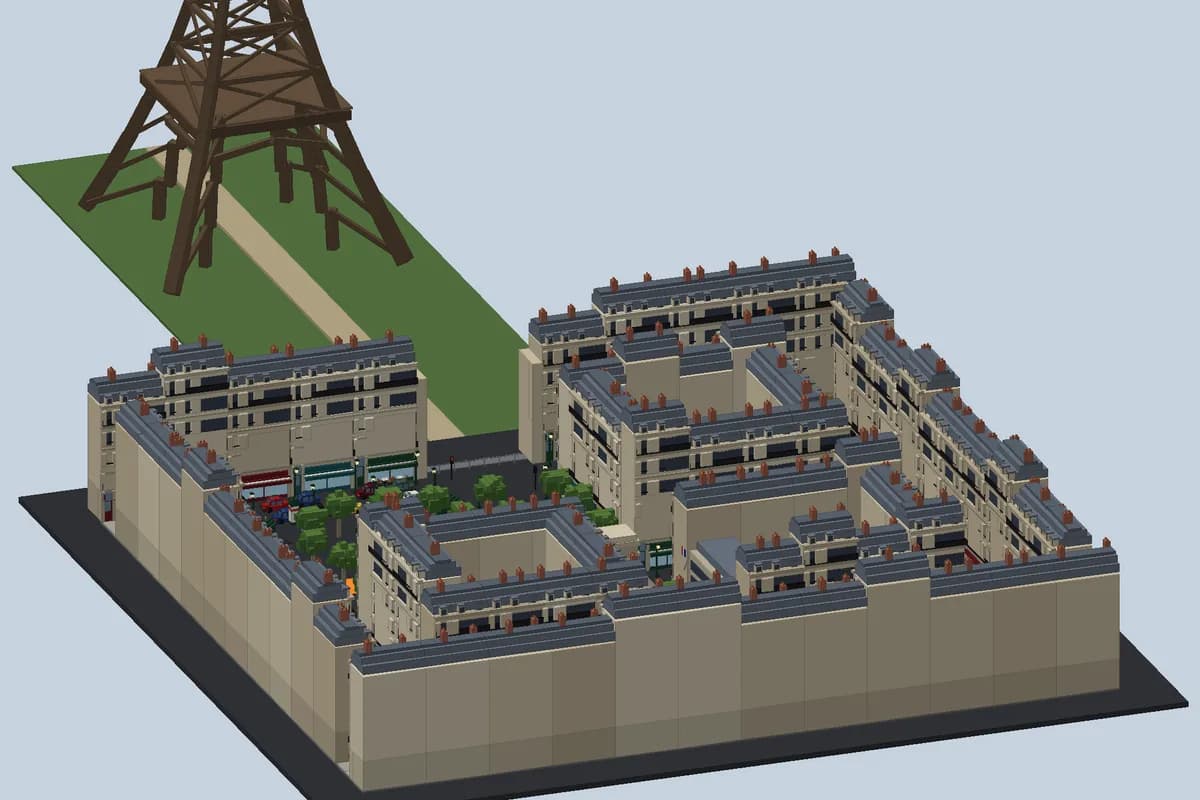
An isometric preview of a generated Roblox Paris map: Haussmann-style buildings around a courtyard with trees, cars and shop fronts, and an Eiffel Tower on a green lawn

1500 to 4000 parts

Enough detail for a district or an island you can walk around, built from Blocks, Wedges, Cylinders, Trusses and Seats rather than uploaded meshes.

One folder per zone

Every area of the map sits in its own folder in Workspace, so you can delete, move or duplicate a whole zone in Studio in one click.

Minimal scripts, your gameplay

Spawn, teleport pads, moving doors, a kill floor under the void and zone names on screen. The rules of the game stay yours to add.

Check it in 3D first

The editor renders the map in your browser, so you can orbit around it and ask the AI for changes before you open Studio.

What makes a Roblox map easy to play on

A good map reads at a glance. Players should know where they spawned, see one or two landmarks they can walk toward, and find paths that link the areas without dead ends. A tall tower, a fountain in a square or a lighthouse on a cliff gives everyone a reference point, and it is the first thing a group of friends uses to meet up. Flat maps feel empty very quickly, so height matters too: stairs, bridges, rooftops and hills turn a plain layout into a place worth exploring.

The generator plans a map that way. It splits your brief into clear zones, places a landmark in each, connects them with roads, paths or walkways and varies the ground level so the view changes as you move. Sizes are planned around a default Roblox character, so doors should be wide enough to walk through and stairs climbable without jumping.

What the map generator builds

The AI writes the level as a map file of real Roblox objects, which Spaleforce turns into a regular place. Nothing is pulled from the Toolbox and no random asset id is used, so the map is complete the moment it opens:

  • Parts of every basic shape: Block, Ball and Cylinder, plus WedgePart for roofs and ramps, TrussPart for ladders and Seat for benches and cars
  • Roblox materials such as Brick, Wood, Grass, Sand, Concrete, Glass and Neon, with PointLights for lamps, windows and signs
  • Repeated elements written as a pattern, so a staircase, a row of trees or a line of street lamps stays regular
  • One folder per zone in Workspace, for example Courtyard, Shops or Tower, so each area can be handled on its own
  • A SpawnLocation where players arrive, and a kill floor under the map that respawns anyone who falls into the void
  • Optional small systems: a day and night cycle, doors and lifts that move, teleport pads between zones and the name of the zone shown on screen when a player enters it

Pick a theme, then describe your map

The map page offers theme presets to start from: city, tropical island, fantasy kingdom, space station, game lobby and race track. Each preset fills in a sensible brief that you can keep as it is or rewrite. You can also ignore the presets and describe any place you like, in English or French.

A useful description names the zones, the landmark of each one and how they connect. "A Paris district: a courtyard with trees in the middle, Haussmann buildings with shop fronts around it, parked cars on the streets and the Eiffel Tower on a lawn at the end of the avenue" gives a much clearer layout than "a city". Say how big the map should feel, whether players walk or drive, and which areas should be indoors. Anything you leave out gets a reasonable default you can change later.

A map, not a whole game

This mode is for creators who already know what their game is and need the world it happens in. The scripts are kept to the basics a map needs: spawning, moving doors and lifts, the kill floor, teleport pads and zone names. There is no shop, no currency and no rounds unless you add them, which keeps the place clean to build on.

Because every zone is a separate folder, the map works as a set of pieces. Open it in Studio, keep the zones you like, remove the others, or copy a zone into a place you already have. If you want the AI to write the gameplay as well, the full game generator, the obby generator and the tycoon generator build the map and the rules together.

Open it in Studio, refine it with the AI

Download the .rbxlx, which is free on every plan, and double-click it with Roblox Studio installed. Press Play (F5) to walk around with a character: check that paths connect, that stairs can be climbed and that teleport pads lead where they should. Studio is free, and the file is a normal place, so every tool you already use works on it.

To change the map, ask the AI in the Spaleforce editor: make the square bigger, add a metro station under the avenue, replace the race track barriers with tyre walls. The map is rebuilt, the scripts are checked again with the Luau type checker, and the 3D preview refreshes. When you are happy with it, publish the experience a first time from Studio with File > Publish to Roblox; after that, the editor can send new versions with your Open Cloud API key.

How it works

  1. 1

    Describe the map

    Pick a preset or write your own brief at /dashboard/new/roblox/map. It uses one of your daily generations.

  2. 2

    Walk around it in 3D

    Orbit around the preview and ask the AI to move zones, add landmarks or change the paths until the layout feels right.

  3. 3

    Open it in Studio

    Double-click the .rbxlx, press Play, then add your gameplay or copy the zones you want into your own place.

Map prompts to paste

Paris district
A Paris district map. In the center, a courtyard with trees and benches, surrounded by Haussmann-style buildings with cream walls, grey roofs and shop fronts on the ground floor (bakery, cafe, bookshop). Streets with parked cars around the block. At the end of the main avenue, the Eiffel Tower on a green lawn. Street lamps that light up at night, with a day and night cycle.
Tropical island hub
A tropical island lobby for a minigame game. A sandy beach with palm trees where players spawn, a wooden dock with boats, a village of huts on stilts, a jungle path up to a waterfall and a volcano at the back. Put teleport pads in the village square, one per minigame, and show the zone name on screen when players enter each area.
Orbital space station
A space station floating in the void, made of four modules linked by glass corridors: a hangar with two shuttles, a control room with screens in Neon, a greenhouse with plants and a lounge with seats looking at a planet. Sliding doors between modules, a lift between the two floors of the hangar and a kill floor far below.

Frequently asked questions

Can I generate a Roblox map without building it by hand?

Yes. You describe the place in plain language and receive a .rbxlx with the map already built from parts, grouped by zone. You can keep editing it with the AI in the editor, or move parts yourself in Studio.

Can I use the generated map in a game I already have?

Yes. Each zone is its own folder in Workspace, so you can open the generated place in Studio, copy the zones you want and paste them into your existing place.

Does the map include gameplay?

Only the basics a map needs: spawn, teleport pads between zones, moving doors and lifts, a kill floor under the void, zone names on screen and an optional day and night cycle. Shops, rounds or currencies are left to you, or to the full game generator.

Does it use free models from the Toolbox?

No. Everything is built from Roblox parts, materials and lights, and the generator never invents asset ids. Sounds, when there are any, are the ones built into every Roblox client.

Can I play the map in my browser?

No. Roblox places only run in Roblox Studio and the Roblox app. The editor shows a 3D preview of the map so you can check the layout; to walk around it, open the .rbxlx in Studio.

Describe the place, walk it in Studio

Pick a theme or write your own brief, check the zones in 3D, then open your map in Roblox Studio.

Generate a Roblox map

Updated October 20, 2026