AI Roblox game generator

Roblox game generator: from an idea to a place you open in Studio

Describe the game you want, an obby, a tycoon, a round-based arena, and the AI builds the whole place: the level, the server and client scripts and the on-screen interface. You download one .rbxlx file, double-click it, and Roblox Studio opens your game ready to play.

Free to start · No credit card

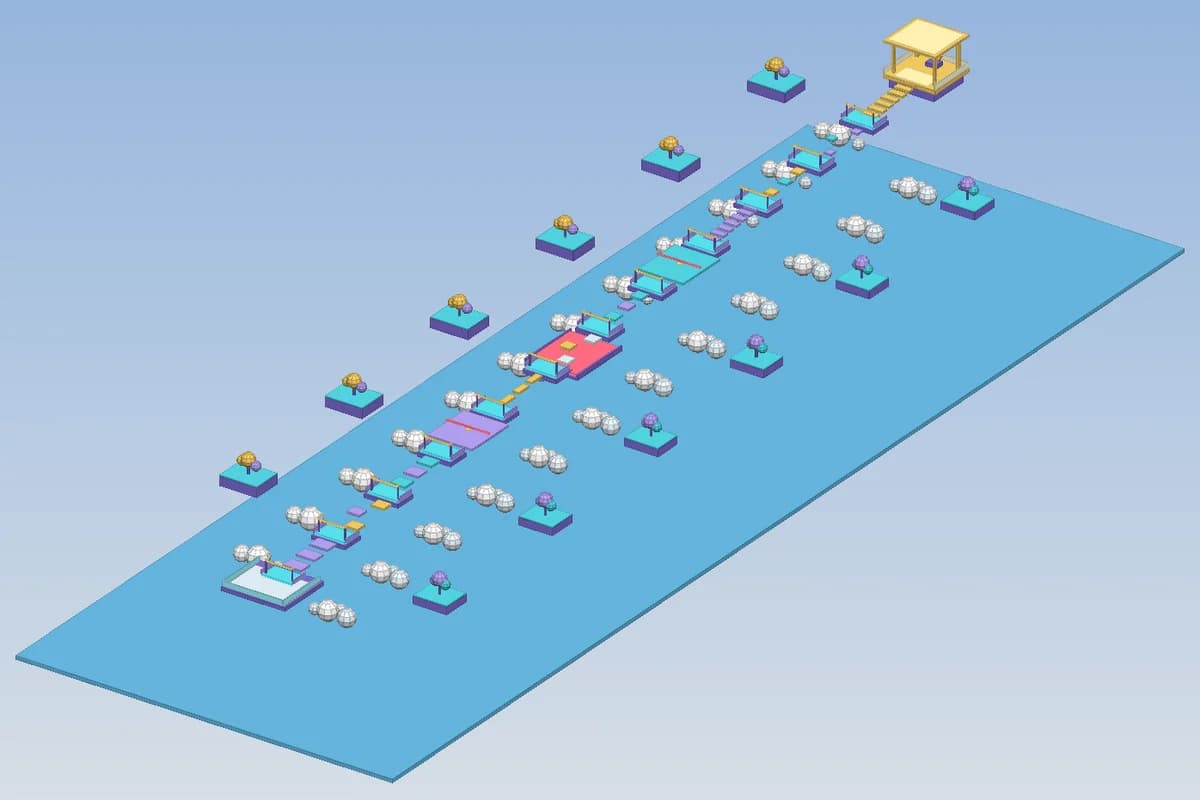
A Roblox obby level generated by Spaleforce: colored platforms, checkpoints and a finish tower, shown in the 3D map preview

One file, opens in Studio

The download is a standard .rbxlx place. Double-click it: map, scripts and UI are already in Workspace, ServerScriptService and StarterPlayer.

Map you can see before downloading

The level is built from real parts, and the editor shows it in 3D so you can check the layout before opening Studio.

Scripts checked against the Roblox API

Every script is strict Luau, parsed and type-checked against the Roblox API before you receive it. Errors are fixed automatically.

No backdoors

External module requires, loadstring and asset loading are refused, the patterns used to hide malicious code in free models.

What the Roblox game generator produces

A Roblox game is a place: a tree of instances that holds the 3D world, the scripts that run on the server, the scripts that run on each player's device and the interface they see. Building one by hand means placing hundreds of parts in Studio and writing Luau for the rules, the scoring, the shop and the UI. The generator does that first pass for you from a written description.

Each generation returns a complete project that Studio loads without any setup step:

  • A level made of anchored parts, wedges, cylinders, spawn points and lights, grouped in named folders under Workspace.Map
  • Server scripts in ServerScriptService that own the game rules: rounds, checkpoints, money, damage, wins
  • A client script in StarterPlayerScripts for the HUD, buttons, sounds and visual feedback
  • A shared Config module in ReplicatedStorage that keeps every tunable number in one place
  • A leaderboard through leaderstats so players see their stage, coins or kills

From the download to a published experience

Roblox Studio is free on Windows and macOS. Once it is installed, a .rbxlx file behaves like any document: a double-click opens it. Press Play and you are inside your game with a character, the scripts running and the interface on screen. Studio's Play Here, Run and local server test modes all work, because the file is a normal place and not a plugin or a script to paste.

When the game is ready, File > Publish to Roblox uploads it to your own account as a new experience. Make it public in the experience settings and players can find it. Nothing is published for you and the game belongs to your Roblox account, so you keep full control over its name, its thumbnail, its monetization and its updates.

Because the project is plain Luau and plain parts, you can keep working on it in Studio exactly as you would on a game you started yourself: move parts, recolor them, add free models, edit the scripts and publish again.

Why generated scripts are safe to open

Free Roblox models are known for hidden backdoors: a single require with a numeric asset id downloads code from someone else's module and gives them control of your server. The generator refuses that pattern outright, together with loadstring, getfenv, setfenv and InsertService asset loading. A project that contains one of them is never saved.

The scripts are also checked the way an experienced Roblox developer would check them. Every file starts in strict mode and goes through a Luau parser and a type checker loaded with the Roblox API definitions. A misspelled property or a method that does not exist is caught on the server and sent back to the AI for a fix, instead of failing silently the first time a player touches the part.

Gameplay follows the rule Roblox recommends: the server decides. Clients send intentions through RemoteEvents, and the server checks distance, cooldown and state before applying them, which keeps the most common exploits out of the game logic.

Edit the game with the AI after generation

The project opens in the Spaleforce editor with the map file and every script listed. You can edit the code directly, or ask the AI in plain language: add a second world, make the lava rise faster, give the shop a double-jump upgrade, translate the interface into French. The AI changes the files, the same Luau check runs again, and you download the updated .rbxlx.

The 3D preview reads the same map file, so a change to the level shows up immediately. Scripts do not run in the browser, since only Roblox Studio and the Roblox client can execute a place, but the preview is enough to check that platforms line up, a path reaches the base or a room has a door.

What it is good at, and its limits

The generator is strongest on games whose fun comes from rules and level design: obbies, tycoons, simulators, round-based minigames, tower defense, escape and hide-and-seek maps. These are made of parts, scripts and UI elements, which is exactly what it writes.

It does not upload meshes, images or audio, because a Roblox asset id must belong to an account that owns the asset, and an id made up by an AI points to nothing or to someone else's content. Visuals are built from parts, Neon, lights and UI frames; sounds use the ones bundled with every Roblox client. You can add your own meshes and sounds in Studio after opening the file.

How it works

  1. 1

    Describe the game

    Write the goal, the rules and the map, or start from a genre: obby, tycoon, simulator, PvP arena, tower defense, horror escape.

  2. 2

    Check the map in 3D

    The editor shows the generated level. Ask the AI for changes until the layout feels right.

  3. 3

    Open in Roblox Studio

    Download the .rbxlx for free and double-click it. Press Play to test, then File > Publish to Roblox.

Prompts you can paste

Rising lava tower
A round-based game: players spawn at the bottom of a tower of floating platforms while lava rises every few seconds. The last player alive wins 50 coins. Show a countdown, the lava height and the winner on screen.
Pet simulator starter
A simulator where players click to collect gems, sell them at a shop pad and buy faster collectors. Three zones unlocked by gates at 100, 1000 and 10000 gems, and a rebirth that doubles gains.
Team capture the flag
Red vs Blue capture the flag on a symmetrical map with two bases, a bridge and side tunnels. Each player gets a sword. First team to 3 captures wins, then the round restarts.

Frequently asked questions

Do I need to know Luau or Roblox Studio?

No. You describe the game in plain language and receive a file that opens in Studio ready to play. Knowing Studio helps if you want to keep editing by hand, but every change can also be asked to the AI in the Spaleforce editor.

Can I play the game in my browser?

Roblox games only run in Roblox Studio and the Roblox app. Spaleforce shows a 3D preview of the map in your browser; to play, open the downloaded .rbxlx in Studio and press Play.

Who owns the generated game?

You do. The place is published from your own Roblox account, with your name, your settings and any Robux it earns. Spaleforce never publishes it for you.

Is the download free?

Yes. Generating a game uses your daily generations, and downloading the .rbxlx is free on every plan, like the other finished files on Spaleforce.

Why does saving player data fail in Studio?

Roblox only allows DataStores in a published place with API access enabled. Generated games keep a session profile as a fallback, so they still work in Studio; publish the game and enable Studio Access to API Services in Game Settings to test saving.

Your Roblox game, one description away

Describe it, check the map in 3D, then open it in Roblox Studio with a double-click.

Generate a Roblox game

Updated October 19, 2026