AI cosmetics maker for Roblox

Roblox UGC generator: hats, wings, pets and swords made with AI

Describe an item and the 3D generator builds it as a textured, blocky model in a clean voxel style. Download it as a .glb sized in studs for Roblox Studio, or send it straight to your Roblox inventory with your API key, then use it in your own games right away.

Free to start · No credit card

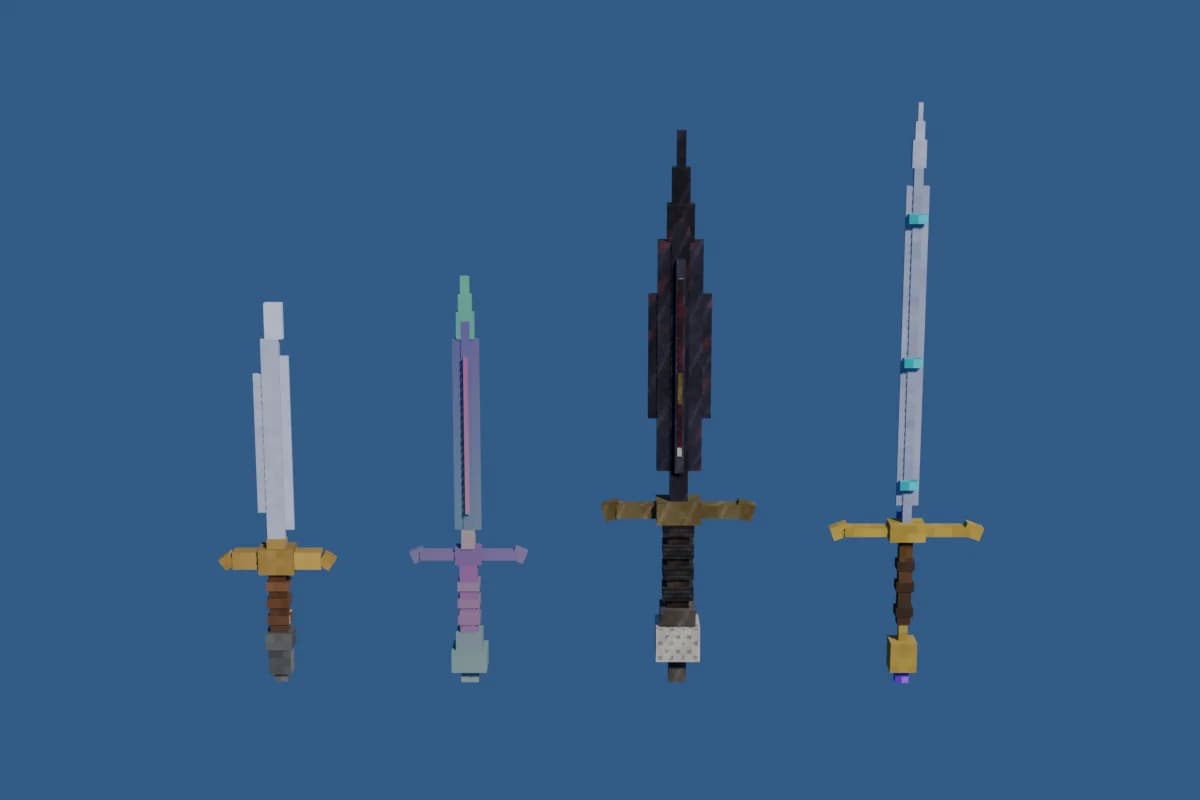
Four blocky 3D swords generated for Roblox (pirate cutlass, mystic sword, demonic blade, kingdom sword) on a blue background

Seven slots

Hat, face, back (wings, capes, backpacks), shoulder pet, waist, tool for held gear like swords and wands, or other.

Sized in studs

The .glb is scaled for the Studio 3D Importer: keep the default Meter unit and the item arrives at the right size.

Pixel-crisp textures

The texture is embedded in the .glb and stays sharp, so the blocky look survives the import instead of turning blurry.

Straight to your inventory

With your Open Cloud key, the model is uploaded to your own Roblox inventory and shows up in Studio under Toolbox > Inventory.

What the Roblox accessory generator makes

Cosmetics are made by the same 3D generator Spaleforce uses for its Minecraft 3D models. The result is a blocky, textured model built from cubes, a style that fits the classic Roblox look and stays readable at avatar scale. Swords keep a clear blade and guard, wings keep a clean outline, a shoulder pet keeps a recognisable face even when it is only a few studs tall.

You describe the item in English or French, pick the slot it is meant for, and the generator returns the model. It then opens in the 3D editor, where you can turn it around, look at the texture up close and ask the AI for changes: a longer blade, a different color, smaller wings, an extra gem on the crown. Each change gives you a new version of the same item.

Slots you can generate for

Choosing a slot tells the generator where the item sits on the avatar, which changes its proportions and orientation:

  • Hat: caps, crowns, helmets, horns, halos and anything worn on the head
  • Face: masks, glasses, visors and face decorations
  • Back: wings, capes and backpacks
  • Shoulder: a small pet or creature that sits on the shoulder
  • Waist: belts, pouches, holsters and tails
  • Tool: held gear such as swords, axes, wands, staffs and shields
  • Other: any prop or item that does not fit the slots above

Getting the model into Roblox Studio

The Download for Roblox button gives you a zip with a .glb, its texture embedded, scaled in studs for the Studio 3D Importer. Open the importer, select the file and keep the default Meter unit: the item comes in at the size it was designed for. The zip also holds .obj, .mtl and .png files if you prefer another tool or want to edit the texture yourself.

The other path skips the file entirely. Send to my Roblox inventory uploads the .glb as a Model asset to your own account using your Open Cloud API key. The key needs the assets permission with Read and Write. Once the upload is done, the model is in Studio under Toolbox > Inventory, ready to drag into any place you work on.

From a model to a wearable accessory or a tool

Inside Studio, the generated model is a regular mesh. To turn it into something an avatar wears, use the Accessory Fitting Tool from the Avatar tab: it lets you place the item on a character, choose the attachment point and create the accessory. For held gear, the model becomes the visible part of a Tool that players equip from their backpack.

These are rigid items: a hat, a sword, a pair of wings or a pet that keeps its shape. The generator does not produce layered clothing, cages or rigged models, so items that bend with the body, like a shirt or a jacket, are outside what it makes.

Using items in your games, and selling on the Marketplace

In your own experiences, a generated item can be used right away: as a shop reward, a prize for finishing an obby, a weapon players pick up or a cosmetic unlocked with coins. Pair it with the Roblox game generator or the tycoon generator and ask the AI to add the item to the shop, then place the model where the scripts expect it.

Selling an item in the Roblox Marketplace, the UGC catalog that other players browse, is a separate process run by Roblox. It goes through Roblox's own UGC upload, with its eligibility rules, fees and moderation, and Spaleforce does not do that step for you. What you generate is yours, so you are free to take the model through that process yourself.

How it works

  1. 1

    Describe the item

    Pick a slot and describe the accessory at /dashboard/new/roblox/cosmetics. It uses one of your daily generations.

  2. 2

    Refine it in 3D

    Turn the model around in the 3D editor and ask the AI for a different shape, color or detail until it looks right.

  3. 3

    Bring it to Studio

    Download the .glb for the 3D Importer, or send it to your Roblox inventory and find it under Toolbox > Inventory.

Accessory prompts to paste

Pirate cutlass
A tool: a blocky pirate cutlass with a curved steel blade, a golden hand guard shaped like a shell and a dark wooden grip wrapped in red cloth. Slightly worn, with a small skull on the pommel.
Ice crown
A hat: a crown made of pale blue ice crystals of different heights, with a glowing white gem in the front and a silver band at the base. Sized to sit on a standard Roblox head.
Shoulder dragon
A shoulder pet: a tiny green dragon curled up, with small folded wings, orange belly scales, big friendly eyes and a tail hanging down the front of the shoulder.

Frequently asked questions

Can I make Roblox accessories with AI?

Yes. You describe the item, choose a slot and receive a textured 3D model sized for Roblox Studio. You can then turn it into an accessory with the Accessory Fitting Tool, or use it as gear in your game.

Can I sell the generated item in the Roblox catalog?

Not through Spaleforce. Selling in the Roblox Marketplace goes through Roblox's own UGC upload, fees and moderation. The model is yours, so you can take it through that process yourself, and you can use it in your own games right away.

Which file do I import into Studio?

The .glb from the Download for Roblox zip. Import it with the Studio 3D Importer and keep the default Meter unit for the right size. The zip also contains .obj, .mtl and .png files.

What permission does my API key need to send items to my inventory?

The assets permission with Read and Write. The key is stored encrypted on the server, only its last four characters are shown back, and you can remove it at any time.

Does it make layered clothing like shirts or jackets?

No. The generator makes rigid items such as hats, wings, backpacks, pets and swords. It does not produce layered clothing, cages or rigged models.

Describe the item, wear it in Studio

Pick a slot, refine the model in 3D, then bring it into Roblox Studio or straight into your inventory.

Generate a Roblox accessory

Updated October 20, 2026