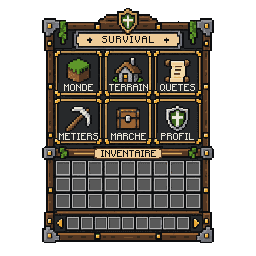
What a Minecraft GUI texture is
Every chest, furnace or crafting table screen in Minecraft Java is drawn from a PNG stored in the game assets. The large chest, for example, uses textures/gui/container/generic_54.png: a 256×256 sheet where only the top left part holds the visible panel, with its frame, its title area and its grid of slots.
A custom GUI texture is a replacement for that kind of sheet, or a brand new background made for a server menu. Instead of the grey vanilla panel, players see a wooden survival hub, a neon lobby selector or a gold-trimmed shop, with the sections of your menu written right on it.
The texture itself is only the picture. What happens when a player clicks a slot is handled by the game or by a plugin on your server, never by the image. Keep that split in mind: this page is about the art, and the logic lives elsewhere.
- Container background: the panel, frame and slot grid players look at
- Labels: the names of the sections, drawn into the texture
- Slots: the squares where the game renders items on top of the texture