AI obby maker for Roblox

Roblox obby generator: stages, checkpoints and a finish line from one prompt

Tell the AI what kind of obstacle course you have in mind, how many stages, which traps, what theme, and it builds the course as real parts with the scripts that make it a game. You get a .rbxlx place that opens in Roblox Studio with a double-click, ready for a first run.

Free to start · No credit card

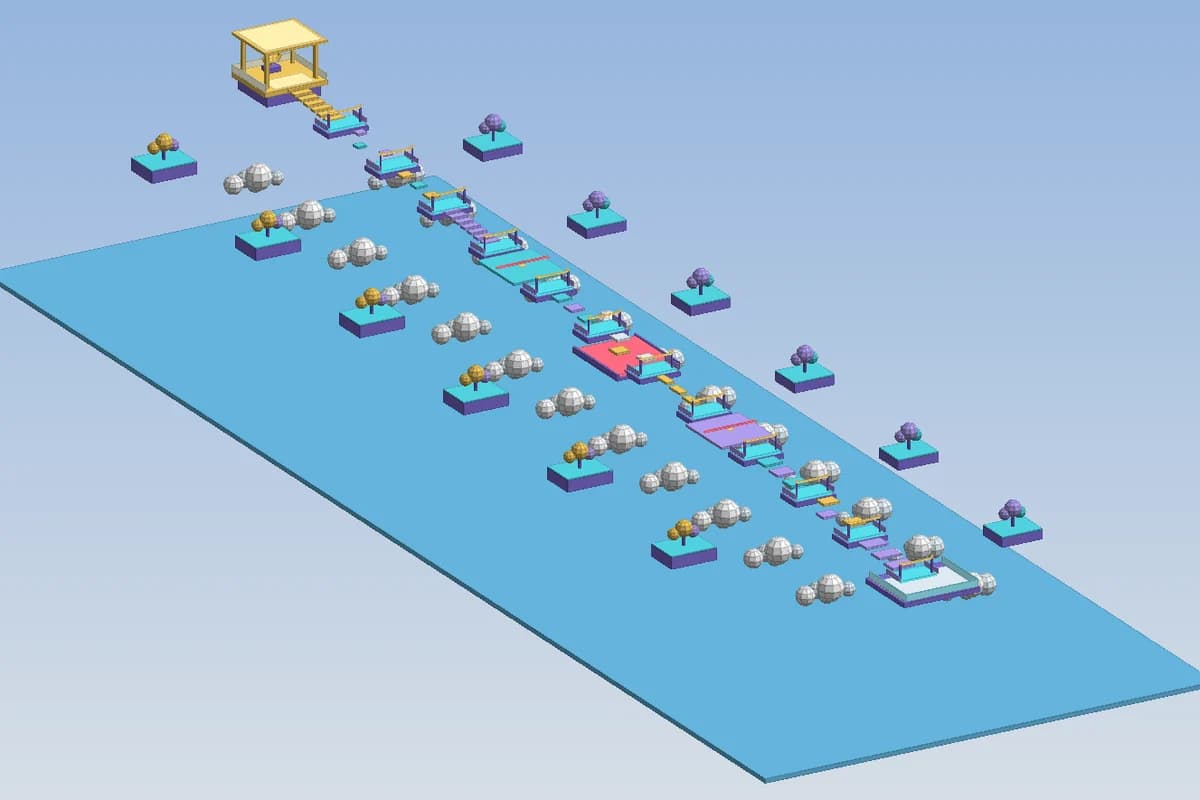
A generated Roblox sky obby: floating stages, checkpoint pads, cloud clusters and a golden finish tower, shown in the 3D map preview

Jumps sized for a real character

Gaps and steps are laid out around what a default avatar can clear, so a stage is hard because of timing, not because the jump is impossible.

Checkpoints that remember progress

Each stage ends on a SpawnLocation pad. The server records the highest stage reached and respawns the player there after a fall.

Traps with server rules

Kill bricks, sliding platforms and spinning bars are driven by server scripts in strict Luau, type-checked against the Roblox API.

Preview the course in 3D

The editor renders the generated map, so you can follow the route from spawn to finish before opening Studio.

What makes an obby fun to climb

An obby lives or dies on its difficulty curve. The first stages should be almost free: wide platforms, short gaps, no traps, so a new player learns how far the avatar jumps and feels progress within seconds. Around the middle, the course starts mixing ideas, a narrow beam followed by a moving platform, a jump onto a part that disappears. The last stages combine everything and ask for precise timing. Players quit when one stage is suddenly far harder than the one before, so the generator raises the challenge step by step instead of in spikes.

Distances matter more than decoration. With the default settings a Roblox character jumps roughly 7 studs high and about 12 studs forward with a running start. A gap of 8 or 9 studs feels comfortable, 11 feels risky, and anything past 12 cannot be cleared without help. The generator keeps every required jump inside that envelope and uses height, width and moving parts to add difficulty, which is how experienced obby builders work too.

The pieces every generated obby includes

A course is more than platforms in the sky. The generated place carries the systems players expect from an obby, each one placed where Roblox runs it:

  • Checkpoints built as SpawnLocation pads, one per stage, so a fall sends the player back to the last stage reached and not to the start
  • Kill bricks in bright Neon that reset the character on touch, handled on the server so a client cannot switch them off
  • Moving and spinning parts: sliding platforms, rotating sweeper bars and blocks that fade in and out on a cycle
  • A Stage value in leaderstats, so the default leaderboard shows how far each player has climbed
  • A run timer in the HUD that starts on the first stage and stops at the finish line
  • A finish celebration with a message on screen, a sound bundled with every Roblox client and a reward such as coins or a win

How to describe your obby in the prompt

The AI works best with a short brief that answers four questions. How many stages, and should they be grouped into worlds or sections? What is the theme, a candy land, a lava cave, a city rooftop run, a course floating above the clouds? Which obstacles do you want and which ones should stay out? What happens at the end: a badge-style win, coins, a teleport back to the lobby?

Say how hard the game should be and who it is for. "Easy obby for younger players, 20 stages, no disappearing blocks" gives a very different layout than "hard tower obby, 40 stages, narrow beams and spinning bars after stage 25". You can also ask for a Skip Stage button, a lobby with a leaderboard board or a second difficulty path. Anything you leave out gets a sensible default you can change later in the editor.

Test it in Roblox Studio, then publish

Download the .rbxlx, which is free on every plan, and double-click it with Roblox Studio installed. Press Play (F5) and run the course yourself: check that each gap feels fair, that every checkpoint catches you after a fall and that the timer stops at the end. Play Here, Run and a local server with several players all work, since the file is a regular place. If a stage is too punishing, ask the AI in the Spaleforce editor to widen it or slow the moving part, and download the updated file.

To ship the game, use File > Publish to Roblox in Studio, which creates the experience on your own account. Once it exists, you can also add a Roblox Open Cloud API key in the Spaleforce editor, link the project to that experience and publish later versions without leaving the browser, as a live update or a draft. The obby, its name, its icon and any Robux it earns stay yours.

Keep the obby fresh after launch

Popular obbies grow in updates: a new world every few weeks, a harder secret path, seasonal decorations. Each of those is a plain-language request in the editor, for example add ten stages after the finish with an ice theme, or move the checkpoint on stage 14 closer to the jump. The scripts are checked with the same Luau type checker after every change, so a new trap cannot quietly break the stage counter.

Because the course is built from parts and Neon rather than uploaded meshes, the place stays light, which helps players on phones. You can still add your own meshes, decals and music in Studio once the layout is final.

How it works

  1. 1

    Write the brief

    Stage count, theme, obstacles and reward at the end. Start at /dashboard/new/roblox; it uses one of your daily generations.

  2. 2

    Walk the route in 3D

    Follow the course in the preview and ask the AI to adjust gaps, traps or the finish until it reads right.

  3. 3

    Play and publish

    Open the .rbxlx in Studio, play it with F5, then publish to Roblox from Studio or from the editor with your Open Cloud key.

Obby prompts to paste

Sky islands obby
A 30 stage obby floating above the clouds. Stages 1 to 10 are wide grass islands with short gaps, 11 to 20 add moving platforms and kill bricks, 21 to 30 use narrow beams and spinning bars. Checkpoint on every stage, stage counter in leaderstats, a timer on screen and a golden finish tower that gives 100 coins.
Easy candy obby
A short obby for younger players with a candy theme: 15 stages, pastel colors, big platforms, no disappearing blocks. Every fall respawns at the last checkpoint. At the end, confetti, a congratulation message and a teleport back to the lobby.
Lava speedrun tower
A vertical tower obby inside a volcano, 40 stages climbing upward, with lava kill bricks on every floor and fading blocks after stage 20. Add a Skip Stage button with a cooldown, a best time saved per player and a leaderboard board in the lobby showing the five fastest runs.

Frequently asked questions

Can I make an obby on Roblox without scripting?

Yes. You describe the course in plain language and receive a place with the map, the checkpoint logic, the traps and the HUD already written. Every later change can be asked to the AI in the editor, or you can edit the Luau yourself if you prefer.

How many stages can a generated obby have?

Ask for the number you want in the prompt. Short courses of 10 to 20 stages and longer towers of 40 stages are both common requests, and you can add more stages later from the editor.

Will the jumps actually be possible?

The layout is planned around the default avatar, which clears about 7 studs of height and around 12 studs of distance. Test each stage in Studio anyway: if one feels too tight, ask the AI to shorten that gap.

Can I play the obby in my browser?

No. Roblox places only run in Roblox Studio and the Roblox app. Spaleforce shows a 3D preview of the course so you can check the route; to play, open the .rbxlx in Studio.

Does progress save between sessions?

Saving uses DataStores, which Roblox only enables in a published place with API access turned on. Before that, generated games keep a session profile, so the obby still works in Studio.

Describe the course, climb it in Studio

Pick a theme and a stage count, check the route in 3D, then open your obby in Roblox Studio.

Generate an obby

Updated October 19, 2026