AI build generator

Minecraft AI build generator: from one image to a finished .schem

Upload a reference image or describe what you want, and our AI turns it into a complete Minecraft build: structure, roofs, facades, furnished interiors, decor and terrain. Check it in 3D with the real block models, then download a .schem for WorldEdit or FAWE.

Free to start · No credit card

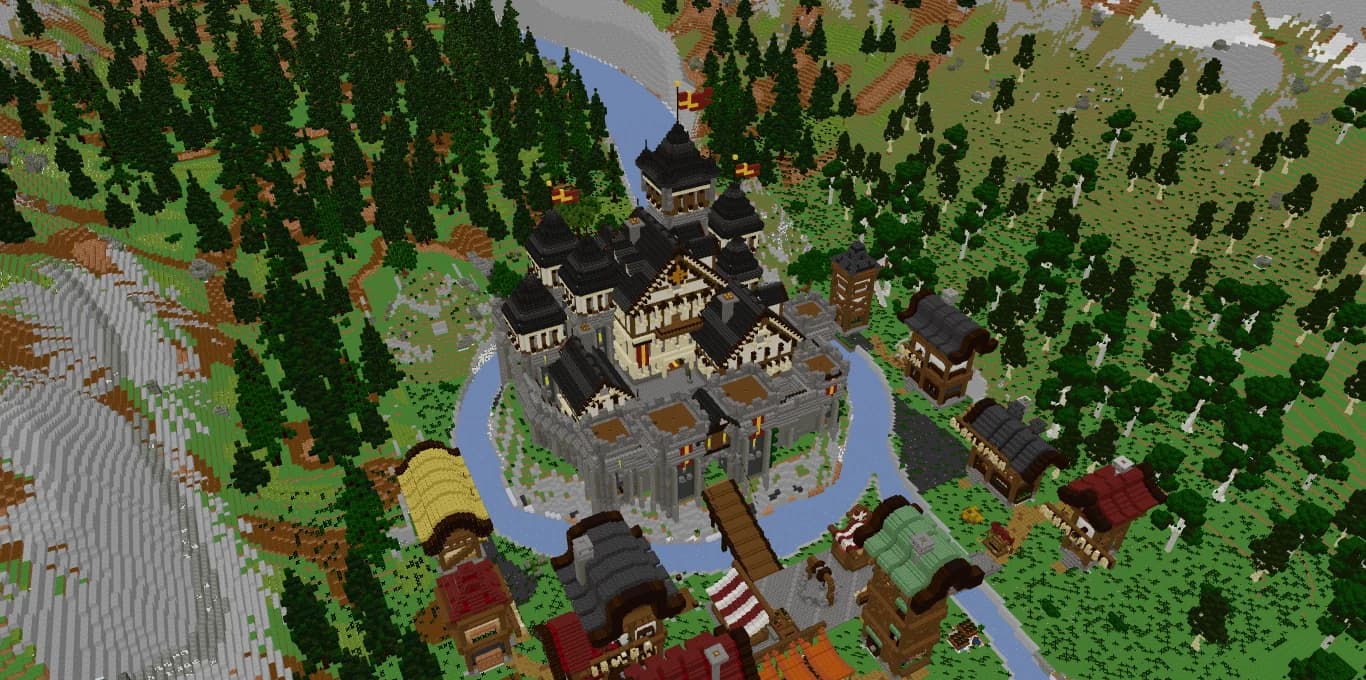
3D render of the Citadelle du Val-d'Or, a Minecraft castle with dark spires on a rocky island generated by AI from one reference image

Image or text to build

Start from a photo, concept art or a screenshot, or from a written description. The AI plans the footprint before it places a single block.

Furnished, not an empty shell

Rooms get furniture, paths get lighting and trees, and the build sits on shaped terrain instead of a flat slab.

A real .schem file

You download a Sponge v3 .schem that WorldEdit and FAWE paste directly. No extra plugin has to run on your server.

3D preview with real blocks

Inspect the build with the actual Minecraft block models before downloading, then replay the construction step by step.

How an AI Minecraft build generator turns an idea into blocks

Most people searching for a Minecraft build generator want the same thing: a build that looks designed, lands in their world in one paste and does not eat a whole weekend. Spaleforce works the way a builder does. The AI starts from the floor plan, decides where walls, towers and courtyards go, then raises the structure layer by layer.

There are two ways in. A reference image gives the AI a silhouette, a roof shape, materials and a mood to match. A text prompt works when you already know what you want: a harbor town, a desert temple, a spawn hub with four portals. Both end in the same place, a complete build you can inspect and download.

Every block in the result is a real Minecraft block. Nothing is invented or modded, so what you see in the preview is what appears in your world.

What the build generator actually places

Four walls and a roof are easy. What makes a build usable on a server is everything around them, so the generator works through the whole scene:

The output is also optimized: a coherent block palette, a staged construction order and a lightweight export, so pasting it stays manageable.

  • Structure: foundations, walls, floors, towers, bridges and stairs, starting from the footprint.
  • Roofs: pitched and spired roof lines shaped with stairs and slabs.
  • Facades: window rhythm, trims and material changes so walls do not read as flat planes.
  • Interiors: furnished rooms with beds, tables, shelves and lighting.
  • Decor: trees, rocks, vegetation and lamps, picked from a library of more than 30,000 decor elements.
  • Terrain: the ground around the build is shaped so the structure sits in a landscape.

Preview in 3D, replay the construction, export .schem

Before you download anything, the build opens in a 3D viewer that uses the real Minecraft block models. Stairs face the right way, slabs sit at half height, and you can orbit around to check the back side and the rooms.

You can also replay the construction step by step, from the floor plan to the finished scene. It is a handy guide if you want to rebuild part of it by hand in survival or see how a roof was put together.

The export is a .schem file in the Sponge v3 format. Load it with WorldEdit or FastAsyncWorldEdit (//schem load, then //paste) and the build appears where you stand. To check a file later, our free schematic viewer opens .schem, .litematic and .schematic files without an account.

Builds you can generate with the AI Minecraft builder

The generator covers the build types server owners and map makers ask for most often:

Our showcase is the Citadelle du Val-d'Or: a castle with dark spires on a rocky island, ringed by water, with a village and mountains around it. It was generated from a single reference image, terrain and village included. More than 400 builds are also published in the Spaleforce marketplace if you want to see what others made.

  • Castles and citadels
  • Houses and villages
  • Spawns and lobby hubs
  • PvP and minigame arenas
  • Islands
  • Temples
  • Modern buildings

How this differs from other AI build tools

Some tools called build generators never give you a schematic. They produce a plugin that places the build with a command, which means installing a .jar on your server, and you never get a file you can open, tweak or paste with WorldEdit. Spaleforce hands you the .schem itself.

Other tools charge credits per build, and a large build can cost hundreds of credits. Spaleforce has no credits or tokens to buy: you start free, and paid plans are monthly subscriptions with daily counters that reset at midnight UTC.

How it works

  1. 1

    Pick your input

    Upload a reference image, or write a description with the style, rough size, materials and what goes inside.

  2. 2

    Let the AI build it

    It lays out the floor plan, raises the structure, then adds roofs, facades, interiors, decor and terrain.

  3. 3

    Check it in 3D

    Orbit around the build with real block models and replay the construction step by step.

  4. 4

    Paste it in your world

    Download the .schem and paste it with WorldEdit or FAWE: //schem load, then //paste.

Prompts to try with the build generator

Medieval castle
A medieval castle on a rocky hill with four towers, a stone keep with dark slate spires, water around the walls, a wooden bridge and a small village of timber-framed houses below. Furnish the great hall.
Survival starter house
A cozy two-story spruce and cobblestone house with a steep roof, a chimney, a furnished kitchen and bedroom, a small vegetable garden and lanterns along the path.
Server spawn hub
A circular spawn hub in white quartz and blue glass, with four arches leading to game portals, a central fountain, benches, trees and lamps.
Desert temple
A sandstone temple on a dune with a stepped roof, carved pillars at the entrance, a torch-lit inner chamber, and palm trees and rocks around the base.
PvP arena
An oval PvP arena in deepslate and blackstone with raised seating, two team entrances with banners, lava-lit pillars and a flat fighting floor.

Frequently asked questions

Is the Minecraft AI build generator free?

You can start free with a Google account and no credit card. The free plan includes 5 AI generations or modifications per day, and the Pro and Ultimate plans raise that daily allowance. There are no credits or tokens to buy.

What file format do I get?

A .schem file in the Sponge v3 format, the schematic format used by WorldEdit and FastAsyncWorldEdit. You load it with //schem load and place it with //paste.

Can I generate a Minecraft build from a picture?

Yes. Upload a photo, concept art or a screenshot and the AI rebuilds it in Minecraft blocks, starting from the floor plan. From a single view, it fills in the sides it cannot see so they match the visible part.

Does it use modded or custom blocks?

No. Every block is a real Minecraft block, and the 3D preview uses the actual block models, so the build looks the same once pasted.

Do I need a special plugin to place the build?

Only WorldEdit or FAWE, which most creative setups already use. You get the schematic file itself, not a plugin that places the build for you.

Are interiors and decor included?

Yes. Rooms are furnished, and the area around the build gets trees, rocks, vegetation and lighting on shaped terrain.

I use Litematica. Can I still use these builds?

The build generator exports .schem, the WorldEdit format, not .litematic. Our free schematic viewer opens .litematic, .schem and .schematic files in the browser, with no account needed.

Generate your first Minecraft build

Bring a reference image or a one-line idea. You get a furnished build, a 3D preview with real blocks and a .schem ready for WorldEdit. Free to start, no card required.

Generate a build

Updated September 17, 2026