Custom Minecraft world maker

Minecraft world generator: describe a place, get a playable Java world

Write what you want to explore, or add a reference picture, and the generator shapes a whole Minecraft world around it: relief, rivers, biomes, trees and rocks in real blocks, with furnished buildings at its heart. Walk through it in 3D in your browser, then download it for Java Edition.

Free to start · No credit card

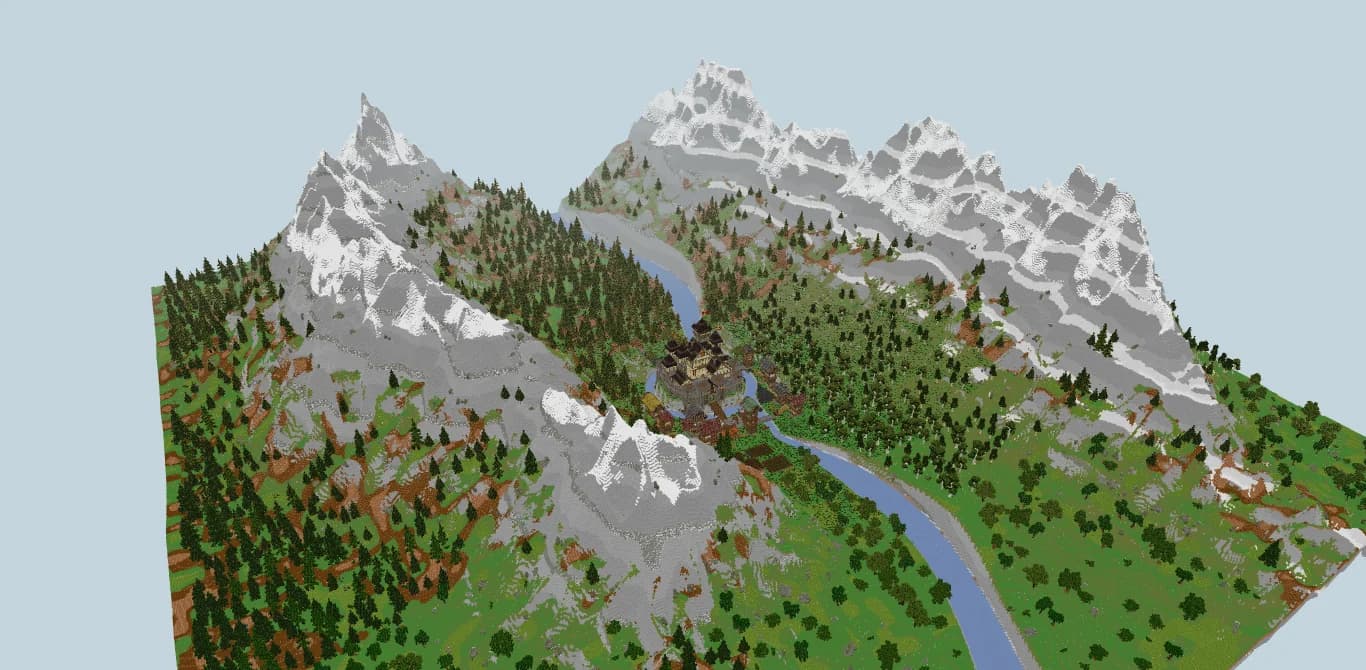
Val des Cimes: a Minecraft Java world with a river valley, spruce forests, snowy peaks, a village and a castle with a moat

Landscape in real blocks

Hills, valleys, rivers, forests and rocks are placed block by block, with vanilla biomes, not a smoothed mesh.

Buildings with interiors

The composition sits on a central plateau blended into the relief, with rooms, stairs and furniture inside.

3D preview and Explore mode

Orbit around the world or walk and fly through it in first person before you download anything.

World .zip and .schem

Get a Java 26.1.2 save for your saves folder and a Sponge v3 schematic of the composition.

What this Minecraft world generator creates

Most Minecraft map generators hand you a random seed and let the game decide the rest. This tool works the other way round: you describe the place you have in mind, such as a Japanese garden, a desert research base, a busy harbor or a fantasy archipelago, and the generator composes a world built around that idea.

You start by choosing between two kinds of project. A full world is an environment with its own landscape, meant to be opened and explored as a save. A build is a composition ready to import into a world you already have. Both come with the same downloads, only the main file changes.

Your description can be anywhere from 20 to 4,000 characters. Name the style, the atmosphere, the buildings and the details that matter to you. An optional reference image (JPG, PNG or WebP up to 10 MB) can guide the composition, the shapes, the colors and the landscape.

A custom Minecraft map with relief, rivers and biomes

Every generated world covers 512 × 512 blocks. The terrain follows a landscape form chosen for your theme, such as plains, a valley, mountains, islands, a canyon, a crater or a coast, with a river when the idea calls for one and a stone and soil palette that suits the setting.

The middle of the map holds a broad, level building plateau that fades progressively into the surrounding relief, so the architecture does not float on a flat square in the middle of hills. Around it, forests, rocks and bushes are placed as real Minecraft blocks, and the world is tagged with vanilla biomes, from meadows and spruce taiga to desert, cherry grove or snowy slopes.

  • Relief and water: hills, cliffs, riverbanks and shores shaped to the theme
  • Nature: tree species, rocks and undergrowth picked for the setting, never generic stand-ins
  • Architecture: buildings, paths and connections laid out on the central plateau
  • Interiors: floors, stairs or ladders, entrances and furniture inside the buildings

Preview your world in 3D before downloading

When the generation finishes, the project opens in a 3D viewer in the browser. It draws the same Minecraft block models and textures as the exported files, so what you inspect on screen is what you will find in the game.

Drag with the mouse to orbit around the composition, or click Explore to move in first person, flying or on foot, through the streets and rooms. A left click on a block selects it and shows its Minecraft coordinates, as the F3 screen would read them. Shift + click adds more blocks to outline an area.

From there, one button adds the selected block or area to your modification request. Instead of writing that the tower on the left needs a roof, you point at it and the coordinates travel with your instructions.

What you download: a Java world save and a schematic

Each finished project offers two files. The world .zip contains a complete Minecraft Java Edition save in the Anvil format, for version 26.1.2: level data, game rules and the region files of the overworld. Unzip it into .minecraft/saves and it appears in your singleplayer list.

The save opens in creative mode with commands enabled, behind a world border. Time, weather, mob spawning and random ticks are paused so that crops, leaves and vines keep the composition as it was generated. You can change those game rules at any time.

The .schem file is a Sponge v3 schematic of the central composition with its surrounding ground, ready for WorldEdit or FastAsyncWorldEdit on a server or in an existing map. For a build project the .schem is the main download; for a world project the .zip comes first.

Val des Cimes: an example world made with our tools

Before you subscribe, you can see the kind of result the tools aim for. Val des Cimes is a real example world made with our tools: a castle ringed by a moat and a village, with 82 furnished rooms between them, a river, spruce and birch forests, meadows and snowy peaks. It covers 1,024 × 1,024 blocks, twice the side of a generated world.

It was exported like a generated project: a Java 26.1.2 world save to drop into your saves folder, which opens in creative mode in front of the citadel, and a .schem of the castle composition for WorldEdit. The screenshots on this page come from its 3D preview.

Plans, credits and generation time

World and build generation is part of the paid plans and is not available on the free plan. Spaleforce Pro (€20/month) includes 1 creation and 1 modification per month. Spaleforce Ultimate (€50/month) includes 5 creations and 5 modifications per month. Creations and modifications are counted separately, per calendar month in UTC.

Each action also uses 20 of the daily AI credits of your plan. A generation takes several minutes depending on complexity, and you can leave the page while it runs: the project keeps going in the background and appears in your projects. If a job fails, the 20 credits and the monthly action are given back.

How it works

  1. 1

    Choose world or build

    A full world with its landscape, or a composition to import into your own map.

  2. 2

    Describe it

    Write 20 to 4,000 characters on style, terrain, buildings and mood, and add a reference image if you have one.

  3. 3

    Explore it in 3D

    Orbit around it or walk through it in Explore mode, and click blocks to note their coordinates.

  4. 4

    Download and play

    Unzip the world into .minecraft/saves, or paste the .schem with WorldEdit.

World descriptions to start from

Japanese garden
A detailed Japanese garden with a pagoda, cherry trees, a pond with a bridge, lanterns and stone pathways.
Future base
A white and cyan futuristic desert research base with furnished laboratories, walkways, antennas and a rock garden.
Trading harbor
A busy trading harbor with docks, boats, furnished warehouses, cranes, a covered market and green cliffs.
Fantasy world
A fantasy archipelago with cliffs, giant mushrooms, overgrown ruins, bridges and naturally connected biomes.
Mountain valley
A green mountain valley crossed by a winding river, with a stone village on the banks, a watermill, spruce forests on the slopes and snow on the highest peaks.

Frequently asked questions

Is the Minecraft world generator free?

Generating worlds and builds requires Spaleforce Pro (1 creation and 1 modification per month) or Ultimate (5 of each per month).

How big is a generated world?

Generated worlds measure 512 × 512 blocks, with a central building plateau blended into the relief and a world border around the edge.

Which Minecraft version is the world for?

The world .zip is a Java Edition save in the Anvil format for Minecraft 26.1.2. Bedrock Edition is not supported.

How do I install the world?

Unzip the downloaded file and place the world folder in .minecraft/saves. Launch the game and open it from the singleplayer list.

Can I use the result on my server?

Yes. Upload the save as your server world, or paste the Sponge v3 .schem into an existing map with WorldEdit or FastAsyncWorldEdit.

Can I change the world after it is generated?

Yes, with a modification from your monthly allowance. Describe what to change, optionally with selected blocks or a new image; a new version is created and the original stays available.

Do I need to keep the page open?

No. The job runs in the background and the finished world appears in your projects. A failed job returns its credits and its monthly action.

Create the world you want to explore

Describe a place, add a reference image if you have one, and walk through the result in 3D before you download it. This experimental first version is available on Pro and Ultimate.

Generate a world

Updated September 23, 2026