AI assistant for Roblox Studio

Roblox Studio AI: the AI writes the place, Studio plays it, Open Cloud ships it

Spaleforce sits next to Roblox Studio rather than inside it. The AI generates the whole place, map, Luau scripts and interface, you look at the level in a 3D preview, playtest the .rbxlx in Studio, ask for changes in plain language and send each new version to your live game through Roblox Open Cloud.

Free to start · No credit card

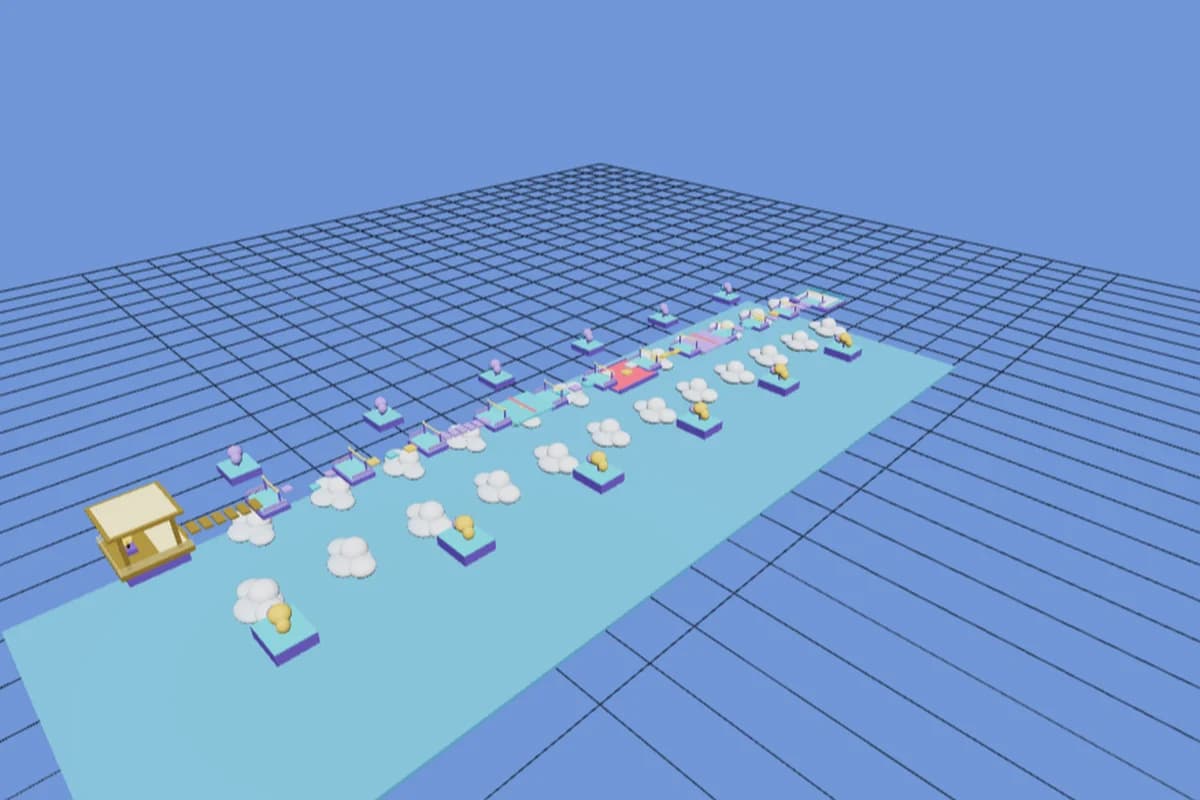
The in-browser 3D preview of a generated Roblox level in the Spaleforce editor

A whole place per request

One description returns the level under Workspace, the server and client scripts and the HUD, saved as a .rbxlx that Studio opens directly.

Preview here, playtest there

The editor renders the map in 3D in your browser. Scripts only execute in Studio, so gameplay is tested with Play there.

One-click improvement ideas

Shop, global leaderboard, sounds and effects, mobile friendly, daily reward and translate are ready-made requests you send with a single click.

Updates through Open Cloud

Link your game once, then publish live, save a draft or restart servers from the editor, with your API key stored encrypted.

Where an AI fits in a Roblox Studio workflow

Roblox Studio is an excellent place to test, tune and ship a game, but starting one from an empty baseplate is slow: every platform is placed by hand, every RemoteEvent is created in the Explorer, every rule is typed in Luau. That blank-page phase is the part an AI handles well, and it is the part Spaleforce takes over. You write what the game is about, and the generator returns a place that already holds the level, the gameplay code and the on-screen interface.

Studio stays the tool where the game actually runs. Spaleforce never replaces it: it prepares the file, keeps the scripts type-checked and, once your experience exists, sends new versions to Roblox for you. Think of the split this way: the AI drafts and revises, Studio executes and lets you feel the game, Open Cloud delivers.

Look at the level in the browser, play it in Studio

Right after a generation, the editor shows the map in an interactive 3D view built from the same parts that end up in the .rbxlx. Orbit around it to check what a screenshot would hide: a jump that is too long, a corridor that leads nowhere, a checkpoint floating above its platform. If something looks wrong, ask for a fix before you even download anything.

What the preview cannot do is run code. Roblox scripts execute only inside Roblox Studio and the Roblox app, so the browser shows geometry, not gameplay. Download the .rbxlx, which costs nothing on any plan, double-click it and press Play in Studio to walk around with a character, trigger the scripts and watch the HUD react. That is where you decide whether the round timer feels right or the shop prices are too high.

Iterate with AI changes between playtests

The usual loop is short. Play a few minutes in Studio, note what bothers you, come back to the editor and describe it: make the second stage easier, double the coin reward, move the shop next to the spawn. The AI edits the files, the Luau checker reads every script again, the 3D view refreshes, and you download the new version to play it once more.

When you are not sure what to add next, the editor offers ready-made ideas under the prompt box. Each one is a full request written for you, sent with one click:

  • Shop: a button opens a store with a speed coil, a gravity coil and a trail, paid with coins earned in the game
  • Global leaderboard: a board in the lobby with the top 10 players, refreshed every minute
  • Sounds and effects: sounds on jump, checkpoint, win and fail, particles on checkpoints and a short camera shake on fail
  • Mobile friendly: bigger touch buttons, an interface that scales with the screen and no action that needs a keyboard
  • Daily reward: a chest in the lobby that gives coins once every 24 hours, with a countdown on it
  • Translate: every visible text in French, Spanish and Portuguese, chosen from the player locale, English by default

Publish updates from the editor with Roblox Open Cloud

Re-importing a file into Studio and publishing by hand after each change gets tedious once a game is live. Open Cloud is the official Roblox API that lets an outside tool upload a new version of a place you own, and the Spaleforce editor uses it through a Publish to Roblox button. There is one condition: the experience has to exist already, so publish it a first time from Studio with File > Publish to Roblox.

The connection takes a few minutes and is done once per account:

  • In Creator Dashboard, open Credentials and create an API key
  • Under access permissions, add the universe-places API system with Write and the universe API system with Write, for your experience
  • Under accepted IP addresses, add the server IP shown in the publish dialog of the editor
  • Copy the key into the dialog: it is stored encrypted, never shown again except its last four characters, and you can remove it at any time
  • Paste your game link (roblox.com/games/…) or its place id to link the project to that experience

Publish live, draft or restart: what each action does

Publish live uploads the current project as the version players see. Save as draft uploads it as a saved version that does not replace the live one, handy when you want to open it in Studio first or let a teammate look at it. Restart servers asks Roblox to restart every running server of the experience, so players already in a session load the new version instead of staying on the old one.

If Roblox refuses an action, the editor says why in plain words: a key that was not copied entirely, a missing permission, an IP address that was not added or a game link that points to the wrong place. The game remains on your Roblox account the whole time, and you can still publish manually from Studio whenever you prefer.

What you still do by hand in Studio

Some parts of a Roblox game depend on assets and settings tied to your account, and the AI deliberately leaves them to you. It never invents asset ids, because an id it made up would point to nothing or to content someone else owns. Visuals come from parts, Neon, lights and UI frames, and sounds from the ones bundled with Roblox.

  • Custom meshes and imported models, uploaded from your own account
  • Your own audio files and music
  • Monetization: game passes, developer products and their prices
  • The icon, thumbnails, description and audience settings of the experience

How it works

  1. 1

    Describe the place

    At /dashboard/new/roblox, write the genre, the goal and the map. One request uses one of your daily generations.

  2. 2

    Check it in 3D

    Orbit the generated level in the editor and ask for layout fixes before downloading.

  3. 3

    Playtest in Studio

    Download the .rbxlx, open it in Roblox Studio and press Play (F5). Publish it once with File > Publish to Roblox.

  4. 4

    Iterate and ship

    Request changes in the editor, then use Publish live and Restart servers through Open Cloud.

Three requests to try in the editor

Lobby before rounds
Add a lobby with a spawn area, a board that shows the next round countdown and a portal that teleports everyone into the arena when the timer reaches zero. Players who join mid-round wait in the lobby.
Harder late stages
Make stages 15 to 25 harder: narrower platforms, two moving platforms per stage and kill bricks that blink on and off every two seconds. Keep stages 1 to 14 as they are.
Welcome screen
Show a welcome screen when a player joins, with the game name, a Play button and a short tutorial of three slides explaining the controls. Players who already played skip the tutorial.

Building a Roblox game by hand in Studio versus starting from the generator

TaskBy hand in StudioWith the Spaleforce generator
First playable versionPlace every part, create folders and remotes, write each scriptWritten from one description, opens in Studio with a double-click
Script quality checksScript Analysis while you type, if you read itStrict Luau type-checked against the Roblox API after every change
Adding a featureDesign it, write server and client code, wire the RemoteEventDescribe it or click a suggestion, then playtest the result
Shipping an updateOpen the file, File > Publish to Roblox, restart servers from the dashboardPublish live and Restart servers from the editor via Open Cloud
Meshes, audio, monetizationDone in Studio and Creator DashboardStill done in Studio and Creator Dashboard

Comparison of workflows as of October 2026. Playtesting happens in Roblox Studio in both cases.

Frequently asked questions

Is this a plugin that runs inside Roblox Studio?

No. The AI works in the Spaleforce editor in your browser and produces a standard .rbxlx place. You open that file in Studio to playtest it, and you can send updates to Roblox from the editor through Open Cloud.

Why does the 3D preview not run my scripts?

Only Roblox Studio and the Roblox app can execute a place. The preview shows the level so you can check the layout; press Play in Studio to see rounds, shops and the HUD in action.

Which permissions does the Open Cloud key need?

Create it in Creator Dashboard > Credentials with the universe-places API system set to Write and the universe API system set to Write for your experience, and add the server IP shown in the editor dialog to its accepted IP addresses.

Can Spaleforce create a new Roblox experience for me?

No. The experience must exist first: publish the place once from Studio with File > Publish to Roblox, then paste its link in the editor. After that, every update can go through Open Cloud.

Is my API key safe?

It is stored encrypted on our server, only its last four characters are ever displayed, and it is used only for publishing, saving drafts and restarting servers of the game you linked. You can remove it at any time.

Let the AI draft, let Studio play, let Open Cloud ship

Generate your place, playtest it in Roblox Studio and push each new version to your game from the editor.

Start a Roblox place with AI

Updated October 19, 2026