AI Luau script generator

Roblox script generator: typed Luau that lands in the right container

Spaleforce writes Roblox scripts as part of a working place, not as loose snippets. You describe a mechanic, the AI writes the server, client and shared module code it needs, a Luau type checker validates every file against the Roblox API, and you open the result in Roblox Studio.

Free to start · No credit card

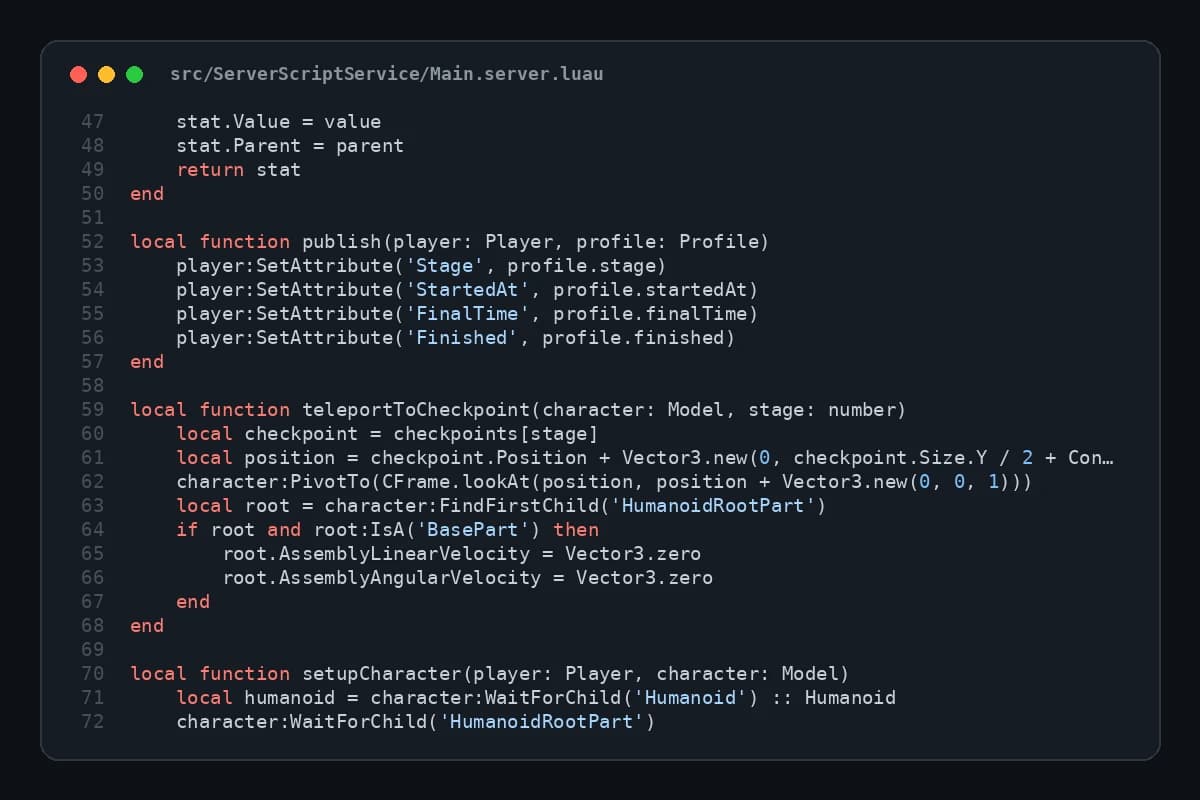
A generated Luau server script (Main.server.luau) in strict mode, with typed checkpoint tables and teleport logic

Strict Luau on every file

Each script begins with --!strict and is parsed and type-checked against the Roblox API definitions before it reaches you.

Placed where Roblox expects it

Server code in ServerScriptService, the client script in StarterPlayerScripts, shared settings in a ReplicatedStorage ModuleScript.

Backdoor patterns refused

require with a numeric asset id, loadstring, getfenv, setfenv and InsertService:LoadAsset never make it into a saved project.

Ask for one feature at a time

After the first generation, request a shop, a daily reward or a global leaderboard in plain language and the scripts are updated.

Luau is not plain Lua

Roblox started on Lua 5.1 and then forked it into Luau, its own language. Most Lua tutorials still read fine, but Luau adds things a generic Lua snippet will not use: optional type annotations, compound assignment such as += and string interpolation with backticks. It also removes or sandboxes parts of the standard library that are unsafe in a shared engine, so code copied from a desktop Lua project often breaks on the first call to io or os.

Types are the main reason to care. When a script declares that a function receives a Player and returns a number, the analyzer can flag a typo in a property name, a nil that was never handled or a method called on the wrong class long before a player hits that line. An AI that writes loose Lua skips all of that; ours writes annotated Luau and then has the checker read it.

Script, LocalScript, ModuleScript: where each one belongs

Half of the bugs beginners report come from a correct script sitting in the wrong place. Roblox decides whether code runs on the server or on a player device from its class and its container, so a perfect LocalScript dropped into ServerScriptService simply never starts.

The generator follows the conventional layout so that Studio runs each file where it should:

  • Script (server): lives in ServerScriptService, owns the rules, the money, the damage and the saving; players cannot read or change it
  • LocalScript (client): lives in StarterPlayerScripts, draws the HUD, reacts to buttons, plays sounds and only asks the server for things
  • ModuleScript (shared): lives in ReplicatedStorage, holds the Config table that both sides require so a price or a cooldown is changed once
  • leaderstats: a folder the server creates under each Player so the default leaderboard shows coins, stage or wins

Server authority and RemoteEvents

Anything that runs on a player device can be modified by that player. A coin counter updated by a LocalScript is a coin counter an exploiter sets to a billion. The fix is architectural: the client sends an intention through a RemoteEvent, for example "I want to buy the speed upgrade", and the server decides whether that is allowed.

Generated server handlers do the checks a careful developer would add by hand: is the character close enough to the shop pad, has the cooldown elapsed, is the round in the right state, does the player own enough currency. Only then does the server change values. You get that structure in every script feature you ask for, including the ones you add later in the editor.

Why free-model scripts can hide backdoors, and what we refuse

The Roblox toolbox is full of useful free models, and some of them carry a few extra lines buried in a nested part. The classic trick is a require on a numeric asset id: at runtime it downloads a module owned by a stranger, who can then run code on your server, give themselves admin or push inappropriate content to your players. loadstring and getfenv or setfenv are used to hide the same thing behind obfuscated strings.

Spaleforce refuses those patterns in generated code: require with a numeric id, loadstring, getfenv, setfenv and InsertService:LoadAsset. A project containing one is not saved. The generator also never invents asset ids for meshes, images or audio, since a made-up id points to nothing or to content someone else owns; visuals come from parts, Neon, lights and UI frames, and sounds from those shipped with every Roblox client.

How to get the script you need

To be clear about the format: this is not a text box that returns a single snippet. Scripts are generated inside a complete Roblox project, because a RemoteEvent handler means little without the client that fires it and the config it reads. The usual path is to generate a small game in the genre you work on, then open the project in the editor and ask the AI for the specific feature, such as a pet egg system or a round timer. The same Luau check runs after every change.

If you already have a game, download the .rbxlx, which is free on every plan, and open it in Roblox Studio next to your own place. Select the scripts, ModuleScripts and RemoteEvents you want in the Explorer, copy them, and paste them into the matching containers of your game. Keep the Config module with them, since the other scripts require it.

How it works

  1. 1

    Generate a starting place

    Describe a small game close to yours at /dashboard/new/roblox. It uses one of your daily generations.

  2. 2

    Ask for the script feature

    In the editor, describe the mechanic in plain language or edit the Luau yourself. Each change is type-checked again.

  3. 3

    Open it in Studio

    Download the .rbxlx, double-click it, press Play (F5) to test, then keep it as a game or move the scripts into your own place.

Script feature requests to paste in the editor

Checkpoint system
Add checkpoints: touching a checkpoint pad saves the stage number in leaderstats, respawning teleports the player to their last checkpoint, and a Skip Stage button on screen asks the server to move them one stage forward with a 30 second cooldown.
Daily reward
Add a daily reward: once every 24 hours a player can claim 100 coins from a button in the HUD. The server checks the last claim time, shows the remaining time on the button and falls back to the session profile when DataStores are unavailable.
Shop with validation
Add a shop pad that opens a UI with three upgrades: walk speed, jump power and double coins. The client only sends the upgrade name through a RemoteEvent; the server checks distance to the pad, price from the Config module and current coins before applying it.

Frequently asked questions

Can I paste a single script request and get just that file?

No, scripts are produced inside a full place so that server, client and shared code fit together. Generate a small game, ask the AI for the feature in the editor, then copy the scripts you need from Studio into your own game.

Does the generator write Lua or Luau?

Luau, in strict mode. Every file is parsed and type-checked against the Roblox API definitions on our server, and if errors appear they are sent back to the AI for one automatic repair pass.

Can I run the scripts in my browser?

No. Roblox code only runs in Roblox Studio and the Roblox app. The editor shows a 3D preview of the map and lets you read and edit each script; press Play in Studio to see them run.

Will the saving code work in Studio?

DataStores only work in a published place with API access enabled. Generated scripts keep a session profile as a fallback, so the game still runs in Studio before you publish it and turn on API access.

Can I publish straight from Spaleforce?

Yes, once the experience exists. Publish it once from Studio, then add a Roblox Open Cloud API key in the editor, link the project to your game and use Publish live, Save as draft or Restart servers. The game stays on your Roblox account.

Describe the mechanic, get checked Luau

Start from a generated place, ask for the script feature you need, and open it in Roblox Studio.

Generate scripts in a Roblox place

Updated October 19, 2026