Deep Pixels and Pixel GPT alternative

A free alternative to Deep Pixels and Pixel GPT for Minecraft GUIs

Pixel GPT by Deep Pixels is known for AI item textures. If what you need is a complete server menu, Spaleforce draws the whole GUI in one go, labels included, and it is free for every account: ten GUIs a day, no card.

Free to start · No credit card

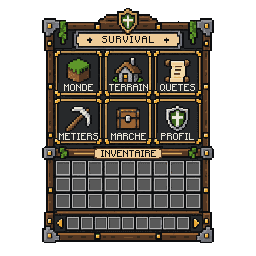
Free alternative to Deep Pixels and Pixel GPT: a full 256×256 Minecraft GUI generated by AI with readable labels

A whole GUI, not a piece

One description gives a finished 256×256 menu texture: frame, plates, slots and section names.

Free for everyone

Ten GUIs per account per day, on the free plan too. No subscription is needed to use the tool.

Labels you can read

Section names are set in a bitmap font after the decor is drawn, so they stay sharp at 1×.

Editable layers

The ZIP separates decor and text, so a word can be changed without drawing the menu again.

Why people search for a free Pixel GPT

Pixel GPT, the generator run by Deep Pixels, made AI pixel art for Minecraft popular: you type an item, and it returns a small PNG texture. Its free "newbie" section is openly presented as limited in image quality and text understanding, and the full model catalogue sits behind yearly plans. That is why so many players look for "Pixel GPT free" or "Deep Pixels free" before paying.

Most of those searches come from server owners, not texture artists. What they really want is a shop menu, a kit selector or a lobby screen that looks custom. An item generator can give the icons, but the menu itself, with its frame, its slots and its titles, still has to be assembled by hand in a pixel editor.

Spaleforce answers that exact need. The GUI generator draws the full menu texture from a description and writes your section names on it. It is part of the free plan, so you can judge the result on your own server before deciding anything.

Where Deep Pixels is the better pick

A fair comparison has to say it: if your goal is hundreds of custom item icons, such as swords, potions or food, Deep Pixels is built for that. It lists 16×16 and 32×32 item modes, many models to choose from and large batches on its higher plans. Spaleforce does not generate standalone item icons.

Deep Pixels also offers a 128×128 pixel art mode and a profile picture mode, handy for avatars or small illustrations. If you already own one of its plans and only need items, keep it. The two tools can live side by side: items from one, menus and block textures from the other.

What the free Spaleforce GUI generator gives you

You describe what the menu is for, the style, the sections and the number of slots, in up to 800 characters. The decor is drawn first with no text on it; the names you wrote are then placed in a crisp bitmap font on plates kept free for them. The result is a 256×256 texture that reads cleanly in game.

Downloading the ZIP gives you gui.png, the finished texture, but also background.png without any text, text.png with the labels alone, layout.json with the position of each label and a four-times preview for Discord or your website. Translating a menu or renaming a section becomes a small edit instead of a new drawing.

Each account can make ten GUIs a day on every plan, one at a time, and a GUI that fails is given back. Drawing takes about five to fifteen minutes; you can close the tab and find the result later under the GUI tab of My Projects.

  • 256×256 pixel-art menu texture with your own section names
  • Separate decor and text layers in the ZIP
  • 10 free GUIs per account per day, no credit card
  • Works for shops, kits, crates, lobbies, RPG and survival menus

Free block textures too

The same free account opens the resource pack studio. Pick your Minecraft Java version (1.13 or later), choose the blocks to repaint and describe the style: the AI draws each block in 16×16 pixel art or in 256×256 HD, and the pack is exported as a ready .zip.

On the free plan, textures are drawn one at a time after a short queue of about ten minutes, with up to 200 per day. Pro and Ultimate remove the queue and the Spaleforce logo stamped on the exported textures, but the tool itself stays open to everyone.

Turning the GUI into a working menu

A texture alone does not react to clicks. Put gui.png in your resource pack, or show it through a custom-GUI plugin, then give each slot its action on the server side. That last part is usually where server owners get stuck.

Spaleforce can write that plugin too. Describe the menu, what each slot opens or sells and the permissions involved, and the plugin generator builds and compiles a Paper or Spigot plugin for your version. Plugins use your generation quota, unlike GUIs and textures, which stay free.

How it works

  1. 1

    Sign in with Google

    A free account is all you need. No card, no trial.

  2. 2

    Describe your menu

    Purpose, style, section names, slots and colours, in plain words.

  3. 3

    Wait a few minutes

    The GUI is drawn in about 5 to 15 minutes and saved in My Projects.

  4. 4

    Download and use it

    Take the PNG for your pack, or the ZIP of layers to edit it later.

GUI descriptions to try instead of assembling one by hand

Prison mine shop
A prison server mine shop in iron and dark stone with rusty bolts: Pickaxes, Enchants, Ranks, Prestige, Sell All, 5 large slots.
Factions main menu
A factions main menu in red banners and dark oak: Faction, Claims, Allies, Wars, Top, Settings.
Daily rewards calendar
A daily rewards calendar in snowy winter style with light blue ice frame: title plate DAILY REWARDS, 7 slots in one row labelled DAY 1 to DAY 7.
Pet selector
A cute pet selector in pastel green and wood with paw prints: Wolf, Cat, Parrot, Fox, Axolotl, 5 large slots.

Spaleforce and Deep Pixels (Pixel GPT) compared, September 2026

CriterionSpaleforceDeep Pixels (Pixel GPT)
Main outputComplete Minecraft GUI and menu textures; AI block textures for resource packsItem textures and general pixel art from a text prompt
SizesGUI: 256×256. Blocks: 16×16 pixel art or 256×256 HDItems: 16×16 and 32×32. Pixel art: 128×128
Dedicated GUI modeYes, with section names written on the textureNot listed among the generation modes
Text on the imageBitmap font set on reserved plates, on a separate layerNot stated
Free use10 GUIs a day and up to 200 block textures a day on the free planA "newbie" section where, in its own words, image quality and text understanding are limited
Paid plansPro €20/month, Ultimate €50/month (not needed for GUIs)From $39.99/year to $199.99/year
Batch generationOne GUI at a timeYes, from 32 to 256 images per batch depending on the plan

Deep Pixels figures come from deep-pixels.com (Home and Pricing pages), checked on September 29, 2026. Deep Pixels and Pixel GPT are names of their respective owners; Spaleforce is not affiliated with them.

Frequently asked questions

Is Spaleforce a free version of Pixel GPT?

No, it is a different tool with no link to Deep Pixels. It focuses on complete Minecraft GUIs and block textures, and both are free on the free plan.

Can Spaleforce make Minecraft item textures like Deep Pixels?

Not as standalone icons. Spaleforce draws full GUI textures and repaints blocks for resource packs. For large sets of item icons, Deep Pixels is the more suitable tool.

How many free GUIs can I make?

Ten per account per day, on every plan, one at a time. A failed or refused GUI does not count.

Are the labels readable?

Yes. Section names are placed in a bitmap font after the decor is drawn, and stay sharp at the real 256×256 size.

Can I use the GUI on a public server?

Yes. Put gui.png in your resource pack or display it with a custom-GUI plugin. Click actions still come from a plugin on your server.

Do I need a subscription?

No. GUIs and block textures are available on the free plan. Pro and Ultimate are for faster textures and for plugin, mod and world generations.

Is there a Spaleforce watermark on the free GUIs?

Yes. On the free plan, the GUI and its decor layer show the Spaleforce logo and name in the centre, drawn in the same pixel font as the labels. Pro and Ultimate GUIs have no watermark, earlier ones included.

Your server menu, drawn for free

Skip the hand assembly: describe the whole menu and get a finished GUI with readable labels and editable layers. Ten a day, no card.

Make a free GUI

Updated September 29, 2026