Free AI GUI generator

Free Minecraft GUI generator: custom menu textures at no cost

Making a GUI on Spaleforce is a gift: it costs 0 generations and needs only a free account. Describe a menu, and a few minutes later you get a 256×256 pixel-art texture with crisp labels, plus the layers to edit it.

Free to start · No credit card

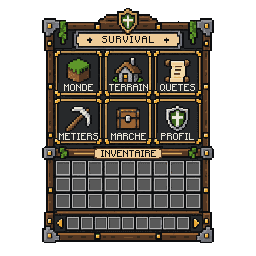
Free Minecraft GUI generator: a medieval survival menu 256×256 generated by AI at no cost

0 generations

A GUI never touches your plugin or mod quota. It is a separate allowance offered by Spaleforce.

10 GUIs per day

Every account, on every plan, can create ten GUIs a day. A failed GUI gives its place back.

No credit card

Sign in with Google and start. Nothing to pay and no card to enter.

Layers included

Decor and labels come as separate files, so fixing a word does not mean starting over.

Why the GUI generator is free

Plugin and mod generations on Spaleforce count against a daily quota, because each run writes, compiles and fixes real code. Menu textures are different: they are small images that almost every server needs, so we decided to offer them. A GUI costs 0 generations, whatever your plan.

To keep the tool fast for everyone, there is a daily allowance of 10 GUIs per account and one GUI in progress at a time. That is enough to draw a full set of menus for a server in a single evening, and to try a few variations of the one that matters most.

If a GUI fails, or if the request is refused, it is not counted. You only use your allowance on GUIs that actually come back finished.

Free AI GUIs, a pixel artist or a premade pack?

Hiring a pixel artist gets you a menu drawn by hand, matched to your brand and revised until it is right. It is the best option for a flagship screen, but it takes days and a budget, and every new section means another request.

Premade GUI packs are cheap and immediate, yet they are shared by every server that bought them, and their labels rarely fit your own sections. Editing baked-in text by hand without breaking the pixel art is slow work.

A free AI GUI sits in between. You describe your own sections and colours, the labels come out exactly as you wrote them, and you can generate several versions in an afternoon. It is also a quick way to test ideas: keep the best results as they are, or hand them to an artist as a clear brief.

Prompt ideas by server type

Good prompts name four things: what the menu is for, the style, the sections and the slots. Below are starting points for the kinds of menus servers ask for most. Change the section names to your own, since they become the labels on the texture.

Survival and SMP servers usually need a main hub that leads to claims, homes and jobs. Skyblock servers lean on shops and island upgrades. PvP and minigame servers want kit and arena selectors that read in a split second, while RPG servers can afford richer decor.

For a lobby or a server selector, keep the list to the modes you really run and ask for large slots, one per mode. For crates, a short preview panel with a few reward slots and a bold title plate works better than a crowded grid.

  • Survival: World, Homes, Claims, Jobs, Market, Profile
  • Skyblock shop: Blocks, Ores, Farms, Tools, Potions, Spawners
  • PvP kits: Warrior, Archer, Tank, Mage, with large slots
  • RPG: Stats, Skills, Inventory, Guild, Quests
  • Lobby selector: Survival, Skyblock, Bedwars, Creative
  • Crates: Common, Rare, Epic, Legendary, with reward slots

Editing the labels with the separate layers

Download the ZIP instead of the PNG when you plan to change anything. It holds gui.png, the full texture, and next to it background.png, the same decor with no text, and text.png, the labels alone on a transparent layer.

To rename a section, open background.png in a pixel editor, write the new word on the empty plate with a pixel font, and save. layout.json tells you where each original label sat, so the new one can take the same place. The same layers make it easy to ship a translated copy of a menu.

preview-x4.png is only for showing the GUI to your team or community: it is the texture enlarged four times without smoothing. Never put it in the game, where the 256×256 gui.png is the file that counts.

What to expect from a free AI GUI

Each GUI is a 256×256 pixel-art texture drawn in clean orthographic style. The decor is painted first with no text, and the labels are then set in a bitmap font on plates reserved for them, so they stay sharp and legible at 1×.

Labels are short uppercase words in the language of your request, and accented letters are supported. Drawing takes about 5 to 15 minutes; you can leave the page, and the GUI waits in My Projects under the GUI tab.

The tool only makes Minecraft GUI, menu and inventory textures, and the download is not an installable resource pack: copy gui.png into your own pack. Slots do nothing by themselves, since click actions come from the game or from a server plugin, which the Spaleforce plugin generator can write for you.

How it works

  1. 1

    Create a free account

    Sign in with Google. No credit card, no trial to cancel.

  2. 2

    Write your menu

    Up to 800 characters: purpose, style, section names, slots and colours.

  3. 3

    Get the texture

    About 5 to 15 minutes later, the GUI is ready in My Projects.

  4. 4

    Download for free

    Take the PNG, or the ZIP of layers if you want to edit the labels later.

Free GUI prompts to copy

Skyblock shop
A SkyBlock shop in floating island style with grass edges and sky blue background: Blocks, Ores, Farms, Tools, Potions, Spawners.
PvP kit selector
A PvP kit selector in red and black netherite style: Warrior, Archer, Tank, Mage, 4 large slots.
Lobby server selector
A lobby server selector with a stone and gold frame and bright icons plates: Survival, Skyblock, Bedwars, Creative, 4 large slots.
Crate preview
A crate reward preview in purple and gold with a treasure chest theme: title plate LEGENDARY CRATE, 9 reward slots in one row.
Fantasy RPG character menu
A fantasy RPG character menu with purple magic crystals: Stats, Skills, Inventory, Guild, Quests.

Frequently asked questions

Is the Minecraft GUI generator really free?

Yes. A GUI costs 0 generations and requires no payment. You only need a free Spaleforce account.

How many free GUIs can I make?

Ten per account per day, on every plan. You can run one GUI at a time, and a failed or refused GUI is not counted.

Do I need a credit card?

No. Sign in with Google and open the GUI tool from your dashboard.

Does making a GUI use my plugin quota?

No. GUIs have their own daily allowance and never touch the generations used by plugins or mods.

Can I use the GUI on my server?

Yes. Put gui.png into your resource pack, or show it through a custom-GUI plugin. The ZIP is a set of layers, not a ready-made pack.

How long does a GUI take?

Around 5 to 15 minutes. You can close the page; the finished GUI is saved in My Projects.

Your next server menu, free

Ten free GUIs a day, crisp labels, editable layers and no card to enter. Describe the menu and let our AI draw it.

Make a free GUI

Updated September 23, 2026