Text to comic, page by page

AI comic generator: from an idea to a lettered comic book

Describe your story in a few sentences. Spaleforce writes the script, draws every page in the style you choose and places the speech balloons. You read the result as a book whose pages turn, and you can still change every line.

Free to start · No credit card

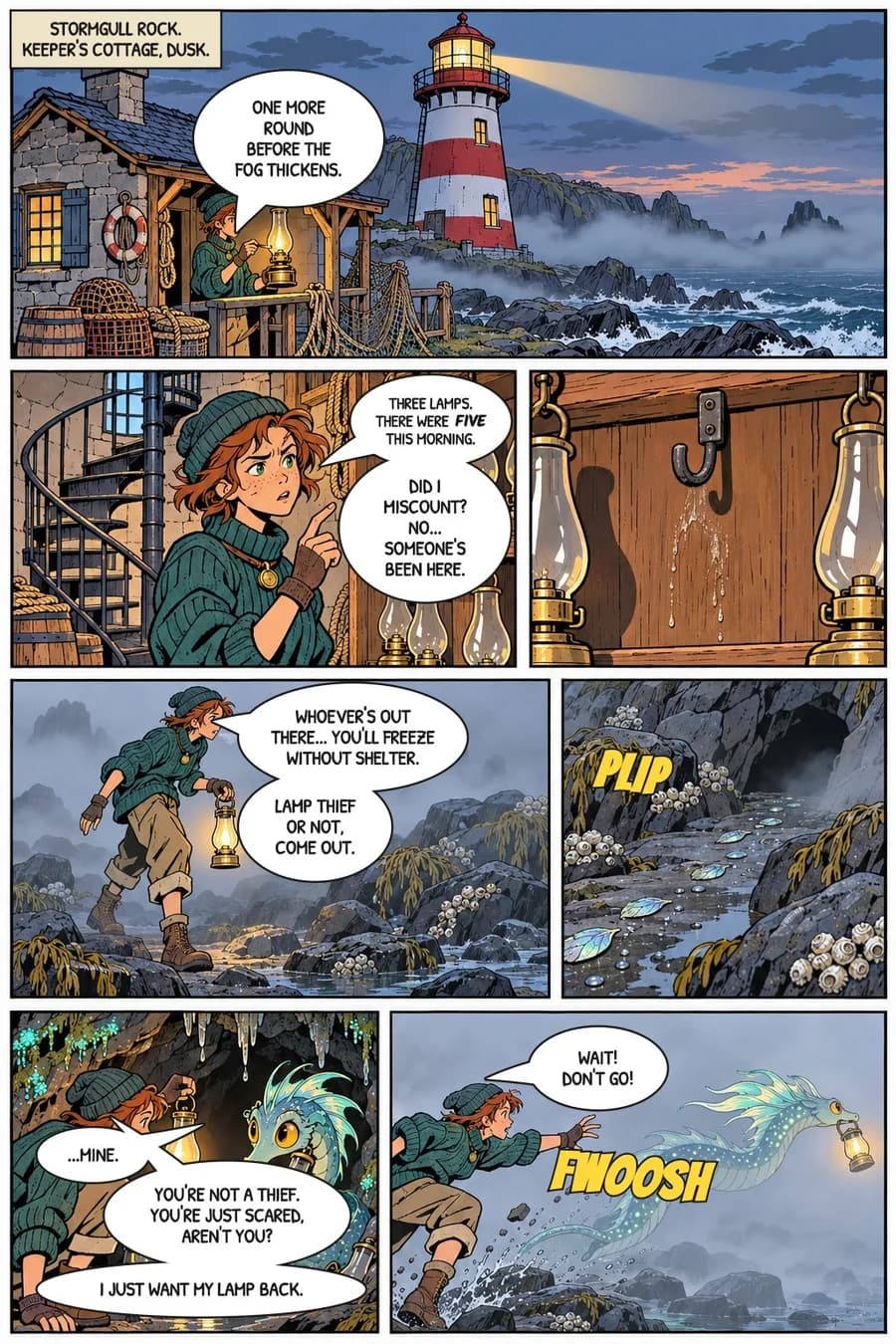
Comic page generated by the Spaleforce AI comic generator: panels, characters and lettered speech balloons

A real script first

Characters, settings and a page-by-page breakdown are written before anything is drawn, so the panels follow each other like shots in a film.

Pages drawn without text

The drawing and the lettering are separate. Balloons are laid out afterwards, which is why you can rewrite them without redrawing.

A book, not a gallery

Your comic opens as a 3D book with a cover, pages that turn and a closing page. It also exports as a PDF.

One page a day for free

The free plan draws one page a day, with a Spaleforce mention. Pro and Ultimate draw a whole comic at once.

What the comic generator actually produces

Most image tools give you one picture that looks like a comic panel. A comic is something else: a sequence. The reader must understand where each scene takes place, who is speaking, and what changed between two panels. That is the part this generator takes care of.

From your description, it first builds a small story bible: the title, the main characters with their face, build and clothes, and the places where the story happens. It then writes the script page by page, five to seven panels per page, with the shot, the action and the lines of each panel. Only then is each page drawn, in portrait format, with the same characters and the same style from the first page to the last.

The last step is the lettering. The drawing comes out silent, without any text. The system finds the panels and the faces, then lays out oval balloons with their tails pointing at the right mouth, narration boxes and sound effects, in reading order. The page you see is the drawing plus that lettering layer.

Choose a drawing style, or copy one

Six styles are ready: clear line for adventure and humour, realistic noir with deep blacks for thrillers and westerns, cartoon with big gestures, soft watercolour for quieter stories, precise science fiction, and black and white manga with screentones.

You can also copy a style. Add an image you like, or pick another comic from your account, and the next pages are drawn with the same kind of line, inking and colours. Only the technique is reproduced. The characters, the subject and the layout of the reference are ignored, and requests to reuse the heroes of an existing series are refused: the generator invents original characters.

Edit the comic after it is drawn

Every balloon stays editable. Open a page, rewrite a line, change a balloon into a shout, a whisper or a thought, add one or delete one: the page is re-lettered in about a second. You can also drag a balloon or the tip of its tail to another spot. These edits are free and do not use any generation.

When the drawing itself must change, describe the change in plain words: "make it night", "she should be holding the lamp", "replace the last panel with a close-up". The page is rewritten and redrawn starting from its current version, so the layout and the characters stay in place. This AI modification is part of the Pro and Ultimate plans.

A comic is never closed. You can add pages later and tell the story where to go next, and the new pages continue from the last panel with the same cast.

  • Rewrite, add or remove balloons by hand, at no cost
  • Move balloons and tails directly on the page
  • Ask the AI to redraw a page with a change
  • Continue the story with new pages, up to 24 per comic

What it costs

The rule is simple: one page costs one generation, taken from the daily generations of your plan. There is no separate credit system for comics.

On the free plan you can draw one page a day. Your comic grows day by day, and each page carries a Spaleforce mention. With Pro or Ultimate you choose the number of pages and the whole comic is drawn in one go, without any mention. If you upgrade later, the mention disappears from the pages you already have. A page that fails to draw gives its generation back.

Tips for a better first comic

Give the generator people and a problem rather than a theme. "A space story" produces a postcard. "A maintenance robot hides broken machines instead of scrapping them, and a young mechanic follows it one night" produces a story, because someone wants something and something stands in the way.

Name two or three characters at most and say what sets them apart. Mention the place and the mood. If you want humour, say what the joke is about. For a single page, think of it as a short scene with a set-up and a pay-off. For a longer comic, say how it should end: the script is planned backwards from that ending.

How it works

  1. 1

    Describe the story

    A few sentences: who, where, what goes wrong. Pick the language of the dialogue and, if you want, a title.

  2. 2

    Pick a style and a length

    Choose one of the six styles or copy one from an image, then the number of pages your plan allows.

  3. 3

    Read it as a book

    Pages arrive one after the other, a few minutes each. Turn them in the 3D book while the rest is being drawn.

  4. 4

    Edit and export

    Fix the lines, ask for changes, add pages, then download a page as an image or the whole comic as a PDF.

Story ideas you can paste

Tender adventure
A young lighthouse keeper discovers that the fog around her island hides a shy sea dragon that steals her lamps because it is afraid of the dark.
One-page gag
A knight who is terrified of horses has to deliver an urgent letter. His squire is a goose who comments on everything. One page, with a punchline.
Detective story
In a rainy harbour town in the 1950s, a tired private detective is hired by a child to find a missing dog and stumbles on a smuggling ring.

Frequently asked questions

Is the AI comic generator free?

Yes, to start. The free plan draws one page a day, with a Spaleforce mention on the page. Pro and Ultimate draw several pages at once, without the mention, within the daily generations of the plan.

How long does a page take?

A few minutes per page: the script is written first, then each page is drawn and lettered. Pages of a longer comic are drawn one after the other so that each one can continue from the previous one, and they appear in the book as they are finished.

Do the characters stay the same from page to page?

That is what the story bible is for. Each character is described once, and earlier pages are given to the illustrator as a reference for the next ones. Small variations can still happen, as with any generated image, and a page can be redrawn with a correction.

Can I change the text after the comic is generated?

Yes. The lettering is a separate layer: you can rewrite any balloon, change its kind, move it, add or remove balloons, and the page is re-rendered immediately. It is free on every plan.

Which languages are supported?

The dialogue can be written in English, French, Spanish, German, Portuguese, Italian, Chinese, Arabic, Russian or Ukrainian. You describe your story in the language you prefer.

Can I make a comic with existing characters or real people?

No. The generator creates original characters and refuses requests built on real people or on the heroes of existing comics, films and games. Copying a style reproduces a drawing technique, not someone else’s characters.

In which format can I download my comic?

Each page downloads as an image, and the whole comic as a PDF with one page per sheet. On the free plan the downloaded pages keep the Spaleforce mention.

Your first page is a few minutes away

Write three sentences about a character and a problem, choose a style, and watch the first page land in the book. If you like it, the story can go on tomorrow, or right away with a plan.

Create my comic

Updated November 18, 2026