AI castle builder

Minecraft castle generator: walls, towers and keep in one .schem

Describe a castle or upload a reference image, and our AI builds the whole fortress: curtain walls, towers, spires, a furnished keep, the water around it and the village below. Preview it in 3D with real blocks, then paste it with WorldEdit.

Free to start · No credit card

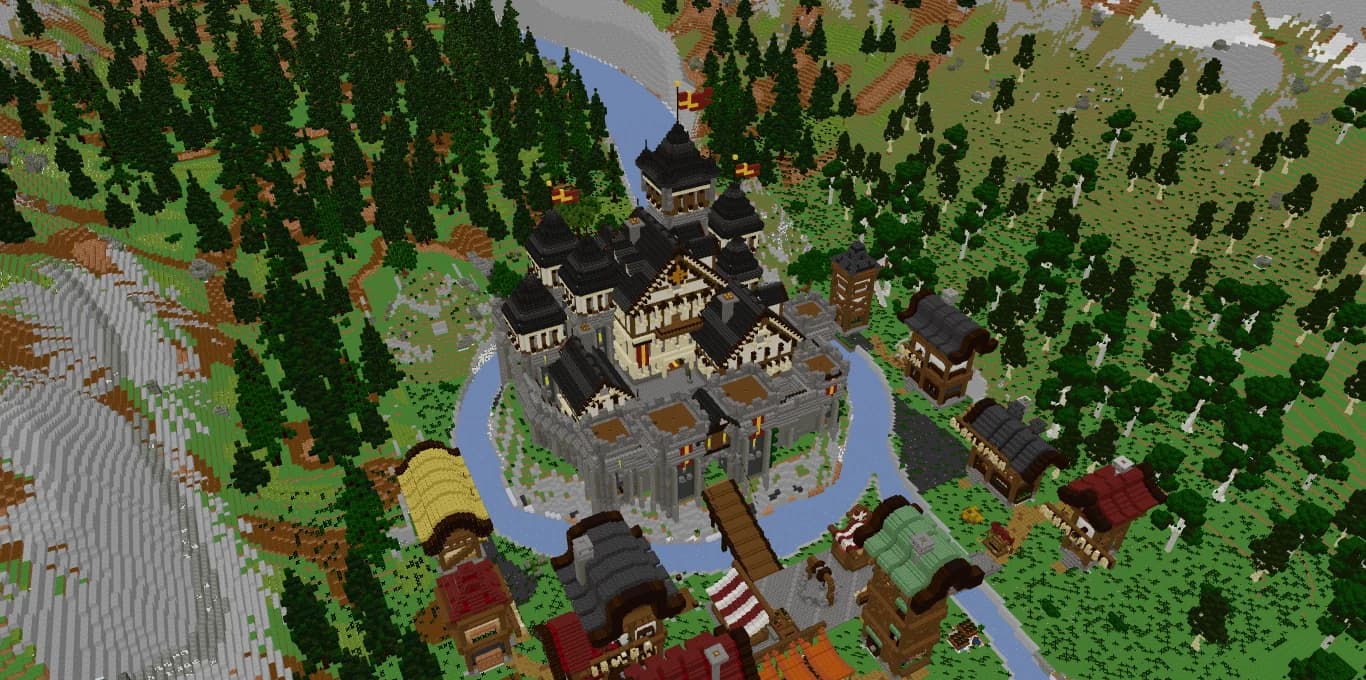
Citadelle du Val-d'Or: an AI-generated Minecraft castle with slate spires, curtain walls, a bridge and a village on a rocky island

The full fortress

Walls, wall walk, gatehouse, towers, keep and roofs are built as one coherent structure.

Lived-in interiors

Great halls, libraries and bedrooms come furnished and lit, not hollow.

Setting included

Rocky ground, water, trees and a village can surround the castle, like in our showcase.

Castle schematic ready

Download a Sponge v3 .schem and paste it with WorldEdit or FAWE.

Case study: the Citadelle du Val-d'Or

Our reference castle started as a single image: a fortress with dark spires on a rocky island. From that picture, the AI built the Citadelle du Val-d'Or, complete with the water that wraps the island like a moat, a village on the far bank and mountains behind.

Replaying its construction shows how a generated castle comes together. Each stage adds one layer of the design, in the order a builder would follow:

The final touches are what make it feel inhabited: burgundy and gold banners, a fountain in the courtyard, lanterns in the rooms, fields and orchards around the village and paths linking everything together.

  • The rocky island, layered cliffs and surrounding river
  • Forest, terraces, paved courtyards and a grand staircase up to the upper castle
  • A polygonal curtain wall with buttresses, arrow slits and a crenellated wall walk
  • A gatehouse with twin towers and a wooden bridge down to the village
  • Guard towers with accessible floors and timber-framed lookouts
  • A great hall, library and bedrooms around a tall central keep
  • Steep slate roofs, multi-level spires and wooden dormers

Castle styles you can ask the AI castle generator for

A castle prompt works best when it names a style, because the style decides the palette, the roof shapes and the wall thickness. Common directions include:

You can also point to a reference picture instead of naming a style. Concept art of a fantasy castle or a photo of a real fortress gives the AI the silhouette and materials to follow.

  • Medieval stone fortress: thick gray walls, square towers, a heavy gatehouse.
  • Fairy-tale castle: tall slender towers, pointed roofs, bright banners.
  • Dark fantasy citadel: deepslate and blackstone, sharp spires, lava or soul lanterns.
  • Desert fortress: sandstone walls, flat roofs, domes and palm trees.
  • Nordic stronghold: spruce palisades, a long hall with a steep roof, stone foundations.
  • Ruined castle: broken walls, mossy stone bricks, vegetation growing through.

From a watchtower to a walled citadel

Castles cover a wide range of scales, so say what you need. A survival player may want a compact keep with a courtyard and a storage room. A server owner may want a castle big enough to hold the spawn, with room for NPCs and portals. An adventure map may need a full citadel with a village, terrain and paths.

The clearest way to steer the size is to describe the parts: how many towers, whether there is an inner courtyard, a moat, a village outside the walls. A prompt that lists four towers and a village produces a very different build from one that asks for a single tower on a hill.

Why a generated medieval castle in Minecraft looks finished

Castles are usually where manual builds stall: the walls go up fast, then the roofs, interiors and surroundings take weeks. The generator treats those parts as part of the job. Roof lines are shaped with stairs and slabs, facades get windows, trims and timber framing, and the decor comes from a library of more than 30,000 elements such as trees, rocks, market stalls, fountains and lighting.

Every block is a real Minecraft block, and the palette stays coherent across the build. The construction is staged and the export is lightweight, which matters when a castle is one of the largest structures on your map.

Pasting your Minecraft castle schematic

Before downloading, open the castle in the 3D viewer. It uses the real Minecraft block models, so you can check the spires, the wall walk and the rooms from every angle, then replay the construction to see how each part was assembled.

The download is a .schem file in the Sponge v3 format. Stand where you want the castle, run //schem load with the file name and then //paste. For a large castle, FastAsyncWorldEdit is a comfortable choice, and //paste -a skips air blocks if you are placing it over existing terrain.

How it works

  1. 1

    Describe or show your castle

    Write the style, the number of towers and what surrounds it, or upload a reference image.

  2. 2

    The AI plans the fortress

    It lays out the walls and courtyards first, then raises towers, keep, roofs, interiors and the setting.

  3. 3

    Inspect it in 3D

    Walk the view around the walls and replay the construction stage by stage.

  4. 4

    Paste the .schem

    Load it with WorldEdit or FAWE and paste it into your world.

Castle prompts ready to paste

Island citadel
A medieval citadel on a rocky island surrounded by a river, with a polygonal curtain wall, a crenellated wall walk, a gatehouse with two towers, a tall central keep with slate spires and a village with fields across a wooden bridge.
Survival keep
A compact stone keep on a hill for a survival base, with one square tower, a small walled courtyard, a furnished bedroom, a storage room full of barrels and a stable.
Fairy-tale castle
A white fairy-tale castle with slim towers and blue pointed roofs, a flower garden, a fountain in the courtyard, a throne room with red carpets and banners on the walls.
Dark fantasy fortress
A dark fortress in deepslate and blackstone on a volcanic cliff, with sharp spires, soul lanterns, a spiked gate, a throne hall and lava falls around the base.
Ruined castle
A ruined medieval castle in mossy stone bricks with half-collapsed towers, a broken wall walk, vines and trees growing inside, and an intact chapel in the courtyard.

Frequently asked questions

Is there a free Minecraft castle generator?

You can start on Spaleforce for free with a Google account and no credit card. The free plan includes 5 AI generations or modifications per day, and there are no credits to buy.

Can I get a Minecraft castle schematic from a picture?

Yes. Upload concept art or a photo of a castle, and the AI rebuilds it in blocks from the floor plan up, including the sides the picture does not show. Our Citadelle du Val-d'Or was made from a single reference image.

Are castle interiors furnished?

Yes. Rooms such as the great hall, library and bedrooms receive furniture and lighting, and the courtyard gets decor like fountains and banners.

How do I paste a castle schematic?

Load the .schem with //schem load, then place it with //paste using WorldEdit or FastAsyncWorldEdit. Add -a to //paste to skip air blocks over existing terrain.

Can the castle include a village and terrain?

Yes. The generator shapes the ground and can add a village, fields, trees, rocks and paths around the walls, as in our showcase castle.

Does it use modded blocks?

No. Castles are built only with real Minecraft blocks, and the 3D preview uses the actual block models.

Raise your castle today

Name a style, list the towers you want or upload a reference picture. You get a furnished castle, a 3D preview and a .schem to paste. Free to start.

Generate a castle

Updated September 17, 2026