Text and image to Minecraft world

AI Minecraft world generator: from a prompt or a picture to a Java map

Our AI reads your description, works out what kind of place you mean and draws up a full plan for it: landscape form, terrain palette, biomes, vegetation, buildings and interiors. The plan is then built in real blocks and exported as a playable Java world. Here is how it thinks, how to write for it and where this first version still falls short.

Free to start · No credit card

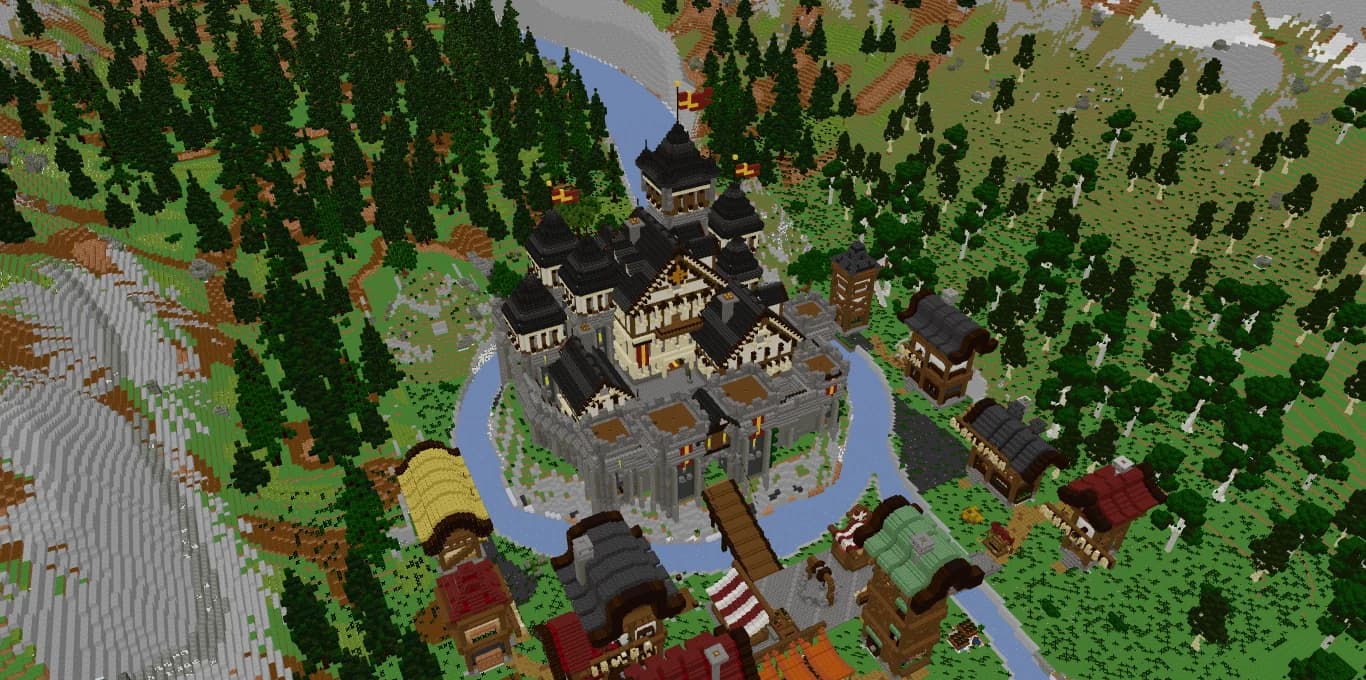
The castle of Val des Cimes, an example Minecraft world with a moat, towers, a village and snowy mountains made with Spaleforce tools

Any theme, not just castles

Futuristic bases, harbors, Japanese gardens or fantasy islands each get their own palette and silhouettes.

Text or reference image

A prompt of 20 to 4,000 characters, plus an optional JPG, PNG or WebP image of up to 10 MB.

Versioned modifications

Ask for changes and get a new version built on the same seed and plan. The original stays.

Honest experimental V1

Real blocks and automatic checks, but no promise of perfect fidelity and no human playtest.

How the AI plans a Minecraft world

An AI map generator is only as good as its plan. Before any block is placed, the AI reads your request and works out the intent behind it: is this a quiet garden, a working port, a research station or a whole region to explore? It then looks for the elements that fit that idea, like tree species, rocks and props with known dimensions, and writes a structured plan.

That plan fixes the landscape first: its overall form (plains, valley, mountains, islands, canyon, crater or coast), how strong the relief is, whether a river runs through it and how wide, which stone, soil and ground blocks make up the terrain, up to eight vanilla biomes, the forest density and whether snow covers the heights.

On top of the terrain comes the architecture. The AI combines original geometry drawn block by block, walls, floors, roofs, frames and openings, with ready-made decor elements placed, rotated and anchored to the ground or the water. Buildings meant to be lived in get floors, stairs or ladders, usable doors and furniture sized to fit.

Not every world is medieval

There is no castle template behind the scenes. The planner is told explicitly not to turn requests into medieval builds, and to match the palette, the silhouettes, the scale and the function of the style you ask for. A white and cyan research base in the desert gets sand, labs and antennas; a trading harbor gets docks, boats, cranes and warehouses.

The examples offered by the tool show the range: a Japanese garden with a pagoda and cherry trees, a futuristic desert base, a busy trading harbor and a fantasy archipelago with giant mushrooms and overgrown ruins. Our example world, Val des Cimes, happens to be an alpine castle valley, but it is a showcase, not a mold.

  • Theme decides the terrain: sand and mineral ground for a desert base, cliffs and shores for a harbor
  • Theme decides the nature: cherry trees for a garden, spruce for a mountain valley, none where it would look wrong
  • Theme decides the architecture: timber-framed houses appear only when the style calls for them

Writing a good prompt for an AI Minecraft map

Think of the prompt as a brief to a builder who has never seen your idea. The text box accepts 20 to 4,000 characters, which is enough to cover five things: the place, its architecture, its terrain, its colors and its atmosphere.

Be concrete about what should exist and how it connects. A pond crossed by a bridge, walkways between the labs or a covered market by the docks give the AI shapes and relationships to lay out. Mention the interiors you care about, such as furnished laboratories or warehouses, and the materials you picture, such as white concrete, dark oak or mossy stone.

Choose the right kind of project as well. Pick a full world when the landscape matters as much as the buildings. Pick a build when you want a composition to import into a map you already run; its layout stays more compact around the center.

Image to Minecraft world: using a reference picture

A reference image is optional and accepts JPG, PNG or WebP files of up to 10 MB. When one is attached, the AI studies what it can see: the composition, the scale, the silhouettes, the architectural language, the materials, the colors, the vegetation and the terrain. It treats the picture as the main visual direction while still following your text.

The image is translated, not traced. Photographic noise, perspective distortion and details that cannot be built in blocks are left out, and the sides a picture does not show have to be interpreted. Concept art, a landscape photo or a screenshot of a map you admire all work as long as the main shapes are readable.

Pair the image with a few lines of text. The picture sets the look; the words say what matters most, for example keeping the waterfall, adding a village on the far bank or using darker roofs than in the image.

Modifying a generated world without losing it

A finished project can be refined with a modification. Describe what to add, remove or transform, for instance enlarging the village, adding a stone bridge and making the forest denser, and optionally attach a new reference image.

The AI reuses the same seed and the previous plan, and it is instructed to keep everything you did not mention. The result is a new version in your projects; the original remains available and downloadable, so an unwanted change never overwrites a world you liked.

To be precise, click blocks in the 3D viewer. Each selected block shows its Minecraft coordinates, Shift + click outlines an area, and one button pastes that location into your request so the change lands where you mean it.

Honest limits of this experimental V1

The world generator is labelled as an experimental first version, and it should be read that way. Generated worlds are 512 × 512 blocks, with the main composition gathered on a central plateau that blends into the relief. Each plan works within a budget of shapes and decor elements.

Automatic checks cover block states, water and the export itself, but they do not certify every room. Interior quality varies, especially in freely invented buildings, and nobody playtests your world before delivery. A reference image guides the result without any promise of a faithful copy.

Access is part of the paid plans: Pro (€20/month) includes 1 creation and 1 modification per month, Ultimate (€50/month) 5 of each, and every action also uses 20 daily AI credits. A failed job gives back both the credits and the monthly action.

How it works

  1. 1

    Write or show your idea

    Describe the place in text and attach a reference image if you have one.

  2. 2

    The AI draws up a plan

    It picks a landscape form, a terrain palette, biomes, vegetation and the buildings to raise.

  3. 3

    The plan is built and checked

    Terrain, architecture and nature are placed in real blocks, then the world is exported.

  4. 4

    Explore, refine, download

    Walk through it in 3D, request a new version if needed, then download the .zip or the .schem.

AI world prompts beyond the medieval

Desert research station
A futuristic research station in a sandy desert, with white and cyan modules, furnished laboratories, raised walkways between buildings, satellite antennas, solar panels and a rock garden around the entrance.
Fishing harbor on cliffs
A fishing harbor at the foot of green cliffs, with wooden docks, moored boats, a lighthouse on the headland, furnished warehouses, a covered fish market and a road climbing to a village on top.
Zen garden island
A small island holding a Japanese garden, with a red pagoda, cherry trees, raked gravel, stone lanterns, a koi pond with a curved bridge and a tea house with a furnished interior.
Mushroom archipelago
A fantasy archipelago of steep islands linked by rope bridges, with giant mushrooms, overgrown ruins, waterfalls falling into the sea and several biomes blending naturally from one island to the next.
Canyon outpost
A frontier outpost built into the walls of a red badlands canyon, with a river at the bottom, wooden balconies, a mine entrance, a saloon with a furnished interior and a watchtower on the rim.

Frequently asked questions

Can the AI make a Minecraft world from text only?

Yes. A description of 20 to 4,000 characters is enough. The reference image is optional and only adds visual direction.

Will the world match my reference image exactly?

No. The image guides the composition, shapes, colors and landscape, but it is interpreted in blocks, and parts it does not show are invented. There is no promise of perfect fidelity.

Does the AI only build medieval castles?

No. There is no castle template. Futuristic bases, harbors, gardens, fantasy islands and other styles each get their own palette, terrain and architecture.

What happens to my world when I modify it?

A modification creates a new version from the same seed and plan, keeping what you did not mention. The original version stays in your projects.

Are the interiors always good?

Not always. Buildings meant to be lived in are planned with floors, stairs and furniture, but quality varies in this experimental version and interiors are not reviewed by a person.

Who can use the AI world generator?

Subscribers to Pro (1 creation and 1 modification per month) and Ultimate (5 of each). The free plan cannot generate worlds; the images on this page show Val des Cimes, an example world made with our tools.

Which edition of Minecraft does it produce?

A Java Edition world for version 26.1.2, delivered as a .zip, plus a Sponge v3 .schem for WorldEdit or FastAsyncWorldEdit.

Give the AI a place to imagine

A few precise lines, a picture if you have one, and you get a Java world you can explore in 3D and refine version after version. Available on Pro and Ultimate.

Start an AI world

Updated September 23, 2026