AI Skript generator

Minecraft Skript generator: describe it, get a working .sk

Skript lets server owners add commands and gameplay with scripts instead of Java. Describe the feature you want in plain language and the AI writes one or more .sk files you drop into your server and reload in seconds.

Free to start · No credit card

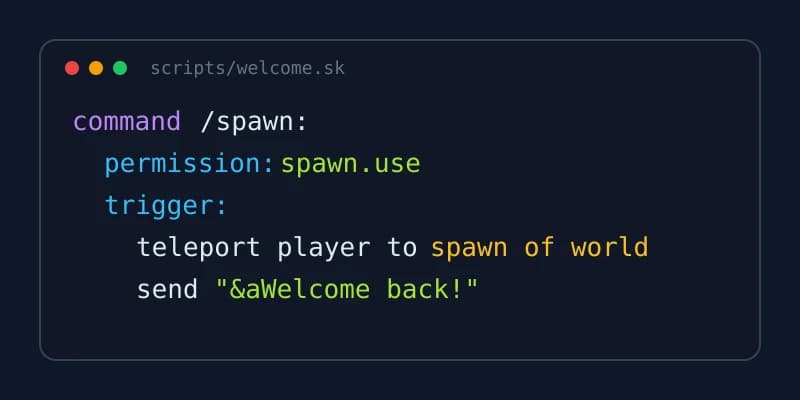
A generated .sk script for the Skript plugin defining a /spawn command with a cooldown option

No Java, no compiling

The output is plain .sk text for the Skript plugin. There is no build step: save, reload, play.

Paper 1.21.1 to 26.3

Pick your server version from 26.3 down to 1.21.1. Scripts target the latest Skript release.

Vanilla Skript syntax

No addon is required unless you name one in your request, so the script runs on a bare Skript install.

Readable and tunable

Settings sit in an options: section at the top, so you change a cooldown or a message without reading the logic.

What Skript is and why server owners use it

Skript is a plugin for Paper servers that reads scripts written in a language close to English. A line such as "on join: send \"Welcome!\" to player" is a complete feature. The plugin parses every file in its scripts folder and turns it into commands, event handlers and timers without any compiler.

That makes it popular for small and medium servers: a staff member can add a /discord command, a join message or a simple kit system in a few lines, then edit it live. The trade-off is that Skript has its own grammar, and a misplaced colon or a wrong indentation level stops the whole script from loading.

This is where a Skript generator saves time. Instead of searching the documentation for the exact phrasing of an expression, you describe the behavior and receive a script that follows the grammar Skript expects.

What the AI Skript generator writes for you

Every generation produces one or more .sk files. Small features fit in a single script; larger requests, such as a homes system plus an admin panel, are split into several files so each one stays easy to read.

The scripts follow a consistent house style, chosen so that you can maintain them after the AI is done:

  • An options: section at the top for prices, cooldowns, messages and other values you may want to tune
  • Per-player variables keyed by the player's UUID, so data survives a name change
  • Functions for logic that repeats, instead of the same lines copied in three places
  • Commands declared with a permission and a usage message
  • Four-space indentation throughout; any tabs are converted automatically, since mixing the two is a classic cause of load errors

Which Skript version and which server

The generator targets Paper servers from 1.21.1 to 26.3. The version picker offers 26.3, 26.2, 26.1.2, 1.21.11, 1.21.8, 1.21.4 and 1.21.1, and the scripts are written for the latest Skript release. Our test run on Skript 2.17.0, the newest version at the time of writing, ended with the console line "All scripts loaded without errors".

Only vanilla Skript syntax is used by default. Popular addons such as SkBee or skript-reflect add useful expressions, but a script that depends on them fails on a server that does not have them installed. If you do want an addon, name it in your request: the script will use it and say so on its very first line, so nobody wonders later why it will not load elsewhere.

Installing a generated script

Place the .sk file in plugins/Skript/scripts on your server, then run /sk reload followed by the script name, or /sk reload scripts to reload everything. Skript reports any problem in chat and in the console with the line number, so you know exactly where to look.

If the project contains several scripts, they download together as a .zip. Extract it into the same scripts folder and reload.

Writing Skript by hand vs generating it

Writing Skript yourself is a fine way to learn, and for a one-line command it is often quicker than describing it. The time goes elsewhere: remembering which phrasing an expression accepts, debugging indentation, and restructuring a script that grew from ten lines to two hundred.

A generator is most useful for the middle ground: features with a few commands, stored data and a cooldown or two. You get a structured starting point in a minute, and you can still open the file and change any line yourself. Because the output is plain text, nothing locks you in.

Edit, refine and download

Once the script is written, the project opens in the online editor. Read the code, change it directly, or ask the AI for a modification in plain language, such as "add a /homes list command" or "make the cooldown 30 seconds for VIPs".

Downloading the finished .sk is free. Each generation uses your plan's generation allowance, the same one as plugin generations; the pricing page lists what each plan includes.

How it works

  1. 1

    Choose your server version

    Select the Paper version your server runs, from 26.3 to 1.21.1.

  2. 2

    Describe the feature

    Explain commands, permissions, messages and cooldowns. Name an addon only if your server has it.

  3. 3

    Review in the editor

    Read the generated .sk files, edit them yourself or ask the AI for changes.

  4. 4

    Install and reload

    Drop the files into plugins/Skript/scripts and run /sk reload.

Skript prompts you can paste

Spawn command with cooldown
A /spawn command that teleports the player to the location saved with /setspawn (permission spawn.admin). 10-second cooldown and a 3-second warmup cancelled if the player moves. Messages and times in options.
Homes system
/sethome <name>, /home <name>, /delhome <name> and /homes. Up to 3 homes per player, 5 with permission homes.vip. Store homes per player UUID.
Daily reward
/daily gives 5 diamonds and 16 golden carrots once every 24 hours. Show the remaining time if the player tries too early. Reward items configurable in options.
Chat filter
Block chat messages containing words from a list in options, warn the player, and broadcast to players with permission chat.staff who tried to say what.

Plugins made with Spaleforce, live on SpigotMC

Each one was generated from a plain-English description, compiled and published as a .jar. Download them on SpigotMC or here.

  • AntiAFK

    AntiAFK monitors player movement and interaction to detect AFK players.

  • AuctionHouse

    AuctionHouse lets players list items for sale at auction.

  • AutoResponse

    AutoResponse listens for configurable keywords in chat and sends automatic responses.

  • BackPack

    BackPack gives each player a portable extra inventory they can open with a command or item.

  • BiomeChanger

    BiomeChanger lets admins select a rectangular area and change its biome.

  • BlockHistory

    BlockHistory logs every block placement and destruction with player name, timestamp, and location.

All our SpigotMC resources

Frequently asked questions

Do I need Java to use Skript?

No. Skript scripts are plain text read by the Skript plugin. You only need a Paper server with Skript installed; there is nothing to compile.

Which Skript version are the scripts written for?

The latest Skript release. Generated scripts were tested on Skript 2.17.0, the newest at the time of writing, and loaded without errors.

Will the script need SkBee, skript-reflect or another addon?

Not unless you ask for it. The generator uses vanilla Skript syntax by default. When you name an addon, the script uses it and states the dependency on its first line.

Where do I put the .sk file?

In plugins/Skript/scripts on your server. Then run /sk reload with the script name, or reload all scripts at once.

Skript says my script has an indentation error. What happened?

Usually tabs and spaces got mixed after editing. Generated scripts use four spaces everywhere; if you edit them, keep the same indentation or let the online editor convert tabs for you.

Should I use Skript or a Java plugin?

Skript is great for commands, events and light systems you want to tweak often. For heavy logic or large player counts, a compiled plugin is usually faster; the plugin generator covers that case.

Is the Skript generator free?

It is free to start, and downloading the .sk is free. Each generation counts against your plan's generation allowance, shared with plugin generations; see the pricing page for details.

Turn your idea into a working Skript

Describe the feature, review the .sk in the editor, and reload it on your server. Free to start, and the download is free.

Generate a Skript

Updated October 18, 2026