AI datapack generator

Minecraft datapack generator for vanilla data packs

Data packs change recipes, loot, advancements and game logic without installing anything on the client. Describe what you want, pick your Minecraft version, and get a data pack that loads on that exact version.

Free to start · No credit card

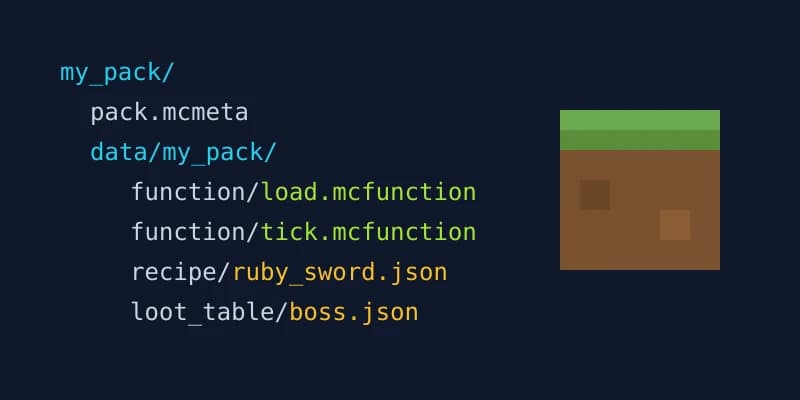
Folder tree of a generated Minecraft data pack with pack.mcmeta, function, recipe and loot_table folders

Right pack.mcmeta every time

Spaleforce writes pack.mcmeta itself for the version you pick, so the pack does not show up as made for another version.

1.21+ folder layout

Singular folder names such as function/, recipe/ and loot_table/, as the game has expected since 1.21.

Checked before saving

Every .json file is validated and every namespace checked. A result that fails these checks is refunded.

Singleplayer or server

Works in a singleplayer world and on any Java server. No mod loader, no plugin.

What a Minecraft data pack can do

A data pack is a folder or .zip that Minecraft loads alongside a world. It is pure data: JSON files and command files read by the vanilla game. Because it lives in the world, players join without downloading anything, and the same pack works in singleplayer and on a dedicated Java server.

The generator writes every kind of file a vanilla pack uses:

  • Functions (.mcfunction): lists of commands, run on demand, on load or every tick
  • Recipes: shaped, shapeless, smelting and other crafting types
  • Loot tables: what blocks, mobs and chests drop
  • Advancements: custom goals and hidden triggers that start functions
  • Predicates and item modifiers: conditions and item changes reused across the pack
  • Tags: groups of blocks, items or functions, including the load and tick hooks

What a data pack cannot do

A data pack cannot add genuinely new blocks, items or textures. It can rename an existing item, give it custom components and change what it does through commands, but the game will still draw it with a vanilla model. New visuals need a resource pack, and truly new blocks or items with their own behavior need a mod.

If your idea falls on that side of the line, use the resource pack generator for textures and models, or the mod generator for new content. A data pack paired with a resource pack covers a surprising amount of ground, but we would rather tell you up front than hand you a pack that cannot deliver.

Why version matters: pack.mcmeta and pack formats

Every data pack declares which game versions it was built for in pack.mcmeta. When the numbers do not match, Minecraft warns that the pack was made for an older or newer version, and recent releases changed the format itself. Up to 1.21.8 the file uses pack_format; from 1.21.9 the game uses min_format and max_format and no longer accepts pack_format.

That is why the AI never writes pack.mcmeta. Spaleforce writes it for the exact version you choose: format 48 for 1.21 and 1.21.1, 61 for 1.21.4, 71 for 1.21.5, 88 for 1.21.9 and 1.21.10, 94 for 1.21.11, 101 for 26.1.x, 107 for 26.2 and 121 for 26.3. The version picker covers 26.3, 26.2, 26.1.2 and every 1.21 release from 1.21.11 down to 1.21.3, plus 1.21.1.

The content follows the same version. Folders use the singular names introduced in 1.21 (function/, recipe/, loot_table/, advancement/, tags/function/), recipe JSON uses the 1.21.2+ format where it applies, and text components are written as SNBT from 1.21.5 onward.

Checks before you download

Before the project is saved, every .json file is parsed to make sure it is valid JSON, and namespaces are checked against the folder structure. If a file fails these checks, the generation is refunded rather than counted.

We also test the pipeline on real servers. A generated pack called RubyTools loaded on a vanilla 1.21.11 server with no version warning; its load function ran, and its loot table dropped the custom item as described.

Hand-written data packs vs a generator

Building a data pack by hand means juggling folder names that changed between versions, a pack format number that changes almost every release, and JSON where a single missing comma silently disables a recipe. Experienced creators manage it, but it is easy to lose an evening to a file that simply does not load.

The generator handles that scaffolding and leaves you the interesting part: deciding what the pack does. You can still open every file in the editor and adjust it by hand.

Install, edit and download

Download the .zip and drop it into the datapacks folder of your world (saves/<world>/datapacks in singleplayer, world/datapacks on a server). Run /reload or reopen the world, then /datapack list to confirm it is enabled.

After generation, the project opens in the online editor. Change files yourself or ask the AI for modifications in plain language. Downloading the .zip is free.

How it works

  1. 1

    Pick your version

    Choose the exact Minecraft version of your world or server, from 1.21.1 to 26.3.

  2. 2

    Describe the pack

    List the recipes, drops, advancements or command logic you want. Be precise about items and numbers.

  3. 3

    Review in the editor

    Browse the generated files, tweak them, or ask the AI for changes.

  4. 4

    Install and reload

    Put the .zip in the world's datapacks folder and run /reload.

Data pack prompts to try

Ruby tools
A "Ruby" set: rename diamond tools to Ruby Sword, Ruby Pickaxe and so on with a red name, craftable from redstone blocks and diamonds. Zombies have a 2% chance to drop a Ruby Sword.
More useful recipes
Shapeless recipes: 9 rotten flesh into 1 leather, 4 string into 1 wool, and smelting gravel gives flint. Keep vanilla recipes unchanged.
Welcome kit
On a player's first join, give a stone sword, bread and a book with the server rules, and show a title "Welcome". Use a scoreboard tag so it only happens once.
Hidden advancements
Five hidden advancements: reach the nether roof, sleep 100 times, kill a warden, eat every food, and fall 200 blocks and survive. Each one gives 5 XP levels.

Frequently asked questions

Can a datapack add new blocks or items?

Not truly new ones. A data pack can rename and customize existing items and change how they behave with commands, but new blocks, items or textures need a mod or a resource pack.

Why does my datapack say "made for an older version"?

Its pack.mcmeta declares a pack format that does not match your game. Generated packs get a pack.mcmeta written for the exact version you picked, so choose the version your world actually runs.

Does it work in singleplayer?

Yes. Put the .zip in saves/<world>/datapacks, or add it when creating a world. It also works on any Java server in world/datapacks.

Do players need to install anything?

No. Data packs run on the server or in the world itself. Players only need a resource pack if you pair one with the data pack for custom visuals.

What if the generated pack does not load?

Every .json and namespace is checked before the project is saved, and a result that fails those checks is refunded. If something still misbehaves in game, ask the AI to fix it in the editor.

Does it work on Bedrock Edition?

No. Data packs are a Java Edition feature. Bedrock uses add-ons, which are a different format.

Is the datapack generator free?

It is free to start, and downloading the .zip is free. Each generation counts against your plan's generation allowance; the pricing page has the details.

Build the data pack you have in mind

Describe it, pick your version, and download a pack with the right pack.mcmeta. Free to start, and the download is free.

Generate a data pack

Updated October 18, 2026